



 Fabian Lainé
Full Guide
Once Human 3.0.4: first-person view finally holds up underwater and while gliding — but not during Deviation ultimates
In brief
Once Human 3.0.4 finally rolls out first-person view across six situations that were previously locked: diving, gliding, Anomaly skills, tactical movement, and decorative interactions. One major exception remains: Anomaly ultimates still pull you out of first-person view, and the comfort settings (First Person Model Offset, Screen Shake Intensity) need manual adjustment to make the session bearable.
Starry Studio rolled out version 3.0.4 of Once Human on Monday, August 24, 2026 at 4:00 PM Pacific time, the day before the console launch. The patch notes are lengthy, and their summary highlights the Global Heat event and the store overhaul.
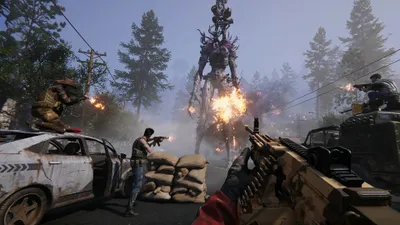
The heaviest piece is elsewhere. Under the heading "comprehensive first person upgrade", the studio describes an overhaul of the underlying logic and rendering of the first-person view — not an addition of options, but a rewrite. Six situations that used to switch to third-person view now stay in first person, and a brand-new setting option has appeared.
A note on sourcing. Starry Studio stopped publishing French-language releases in 2025, so this guide is built directly on the English patch notes for 3.0.4. All item, currency and system names below are the publisher's own English labels.
The six situations that now stay in first person
Until now, Once Human's first-person view was a shooting view: it held as long as you were walking and aiming, and dropped as soon as the game moved on to something else. 3.0.4 fills six gaps.
| Situation | What is now possible |
|---|---|
| Underwater | Dive and explore entirely in first-person view. All usable items underwater have received a first-person use animation |
| Gliding | Enter and exit gliding without ever leaving the view, including during a dive |
| Deviation combat | The combat abilities of most Deviations can now be used directly in first-person view |
| Aero Leap and Slide | Usable at any time, with support for all four directions |
| Environmental interactions | Ladders, ziplines, and badge-based door openings |
| Shield generator | Dedicated use animation, in RaidZone |
The first two lines are the ones that change a session the most: underwater exploration and gliding were exactly the two moments where the camera used to take control away from you.
Deviations: what works, and what doesn't work yet
This is the point where the notes are the most precise, and it's worth reading carefully before reworking your team.
What works: the studio announces having addressed the majority of combat Deviations, and names three explicitly — Invincible Sun, Pyro Dino, and Polar Jelly.
What is excluded: Deviations with "special mechanics", with one explicit example, Whalepup.
What isn't there yet: ultimates. The text is clear on this point — the studio says it wants to "continue refining the rendering of Deviation ultimates" and to "gradually support their activation in first person". In other words, right now, triggering an ultimate will still pull you out of first-person view.
Practical consequence: if you play in first-person view for comfort rather than for a love of shooting, build a team around Deviations whose abilities you mainly use, not their ultimates. The back-and-forth of the camera remains the main source of annoyance.
The setting to open first: First Person Model Offset
A brand-new option appears in the settings panel: First Person Model Offset. It adjusts the distance between the weapon model and the edge of the screen.
The studio itself explains the two opposing use cases it's targeting: the shooter player who wants their weapon tucked against the edge of the field of view to clear the screen, and the cosmetics collector who wants to see their weapon's details. Both settings are now possible on the same account.
This is the first setting to open after the update, because the default value suits neither camp.
Screen shake finally obeys the slider meant for it
Second quality-of-life fix, and this one has a medical relevance the studio explicitly mentions.
Screen shake in first-person view followed its own logic. It now strictly follows the "Screen Shake Intensity" option in the settings panel. The text adds a note aimed at players prone to 3D motion sickness: lower this slider as much as needed.
Until now, lowering the slider only fixed part of the problem, which forced part of the playerbase into third person. That's no longer the case.
Two other tweaks round out the batch:
- Melee: camera sway while moving with a melee weapon has been "greatly improved," and the transition animations between two hits have been adjusted.
- Climbing: the trigger timing for climbing animations in first-person view has been revised, reducing jerkiness on rough terrain.
On controller, the classic item bar makes a comeback
The update lands the day before the console launch, and the controller section bears the mark of that timing. Three changes matter.
1. The horizontal item bar is back. The studio says it received "a lot of feedback" from players requesting it. It coexists with the wheel: two options — Wheel and Horizontal Hotbar — are available in the settings.
2. Button remapping arrives. A custom button configuration feature, described by the studio as "long overdue," is accessible under Settings > Controller > Button Details > Custom Settings.
3. Reload and interact can now be separated. This is the most concrete point for anyone already playing on controller. The priority conflict between "Reload" and "Interact with Target" — a problem the patch notes call long-standing — can now be resolved in the custom settings: same button, or two separate buttons, whichever you prefer.
Added to this are revised cursor sensitivity with a new magnetism setting, continuous hold-to-scroll navigation in the Tab menu, refined stick and trigger dead zones, and an expanded universal interaction range.
What 3.0.4 does not do
To avoid setting false expectations, three limits are spelled out in black and white in the patch notes:
- Deviation ultimates still pull you out of first-person view.
- Deviations with special mechanics are not supported, with Whalepup serving as an example.
- The overhaul does not affect third-person view; a separate fix also notes that the third-person camera could shift after a character wakes up.
Three things to sort out before your next session
- Open First Person Model Offset and decide: weapon flush with the edge or weapon visible.
- Check "Screen Shake Intensity" — the slider now controls the full amount of shake.
- On controller, choose between wheel and horizontal bar, then decide whether "Reload" and "Interact" share a button.
Next deadline: the following update is scheduled for September 2, 2026, 4:00 PM Pacific Time, which is 1:00 AM on September 3 Central European Summer Time.
Share this article
In first-person view, what do you mainly aim for?
Frequently asked questions
Will I be able to use my Anomalies' ultimates in first-person view?
No. For now, triggering an ultimate still pulls you out of first-person view. The studio promises to keep refining this mechanic, but it's not part of the 3.0.4 update. If you play entirely in first-person view, build your team around skills, not ultimates.
Which Anomalies work with first-person view?
Most combat Anomalies work. The studio explicitly names three: Invincible Sun, Pyro Dino, and Polar Jelly. Anomalies with special mechanics, like Whalepup, remain excluded. Check the official patch notes before rebuilding your team.
What is First Person Model Offset for?
It's a brand-new setting that controls the distance between your weapon and the edge of the screen. A shooter-focused player wants the weapon tucked to the edge to clear their view; a skin collector wants to see it in detail. You can now choose either on the same account. It's the first setting to check after the update, since the default value satisfies no one.
Motion sickness in 3D blocks me from using first-person view — does 3.0.4 fix that?
Yes. Until now, Screen Shake Intensity only controlled part of the shaking effect. Now, the slider governs the entire effect. The studio explicitly mentions this for players prone to motion sickness: lower the slider as much as needed to make the session bearable.
On controller, is there finally remapping?
Yes. A custom button configuration feature is arriving under Settings > Controller > Button Details > Custom Settings. You can now split Reload and Interact onto two separate buttons, an issue the studio described as long-standing.
Key takeaways
- Diving and gliding, two key exploration moments, can now be fully experienced in first-person view.
- Anomaly ultimates still kick you out of first-person view — you'll need to pick your creatures based on their skills, not their ultimates.
- First Person Model Offset and Screen Shake Intensity are the first two settings to check after the update: the default value doesn't suit anyone.
- Controller remapping has finally arrived, with the option to split Reload and Interact onto two separate buttons.
- Anomalies with special mechanics, like Whalepup, remain excluded from the overhaul — only standard combat Anomalies get first-person view.
Comments
No comments yet. Be the first to react!
Leave a comment
Similar guides


Latest articles






Your opinion counts
Rate Once Human
Click a star to rate