



 Fabian Lainé
Tips
Minecraft 26.3 Snapshot 10: Mojang renames five maps — and the French file hasn't budged a single line
In brief
Minecraft 26.3 Snapshot 10 renames five maps in English for more consistency, but the French translation file wasn't touched: as a result, thirty labels display in English for lack of a French equivalent, including the entire Realms screen and two subtitles. Beyond this normal localization catch-up for a snapshot, the update reintroduces the Amber Forest panorama, adds visual particles to the Chorus, and reverts recent changes to the Drowned.
Mojang released snapshot 10 of version 26.3 of Minecraft: Java Edition on Tuesday, August 25, 2026. It changes little about the game — a panorama, an icon, some technical fixes — but it contains a housekeeping operation that will confuse French players: five maps are changing names.
We compared the official language files of snapshot 9 and snapshot 10, as distributed by Mojang. The result is clear: the French file has not been modified at all. Not a single value changed, not a key added, not a key removed. As a result, thirty labels exist in English and have no French equivalent in this snapshot.
The five renamed maps
Mojang's notes announce four renames "for more consistent naming." The language file adds a fifth, the swamp map:
| English name before | English name after |
|---|---|
| Ocean Explorer Map | Ocean Monument Map |
| Woodland Explorer Map | Woodland Mansion Map |
| Jungle Explorer Map | Jungle Pyramid Map |
| Trial Explorer Map | Buried Trial Chambers Map |
| Swamp Explorer Map | Swamp Hut Map |
The logic is clear: Mojang is dropping the word "Explorer" in favor of naming the maps after the structure they point to. A player who bought an Ocean Explorer Map without knowing what it showed now gets a map that says "ocean monument" right on the label.
What a French player sees in this snapshot
The four new item labels — Ocean Monument Map, Woodland Mansion Map, Jungle Pyramid Map, Buried Trial Chambers Map — and the fifth, Swamp Hut Map, do not exist in the French file. The game therefore falls back on English to display them.
Here are the French names the client has been displaying until now for these same items, and which remain the game's names until the translation catches up:
| New English name | Official French name of the item |
|---|---|
| Ocean Monument Map | Ocean Monument Map |
| Woodland Mansion Map | Woodland Explorer Map |
| Jungle Pyramid Map | Jungle Explorer Map |
| Buried Trial Chambers Map | Trial Explorer Map |
| Swamp Hut Map | Swamp Hut Map |
A French inconsistency that predates the renaming
Checking these labels, we come across an older flaw, and one more annoying in everyday play: in French, the same map doesn't carry the same name depending on whether it's in your inventory as an item or already filled in.
- the item is called "Carte de monument océanique";
- the filled-in map is called "Carte d'exploration des océans".
Same thing for the jungle: the item is a "Carte de temple de la jungle", while a filled-in map may be called "Carte d'exploration des jungles" or "Carte de temple de la jungle" depending on the key used. If you sort your chests by name, these maps don't end up together.
The twenty-five other untranslated labels
The maps aren't alone. Among the thirty English keys with no French equivalent, we notably find:
- The entire new Realms intro screen — thirteen labels, including the titles "Your own server, always online", "A better way to play together", "Minigames - Free creator content" and the "Try for free" button. This is precisely the screen the snapshot adds, and it displays automatically when entering Realms if a trial is available.
- The four feedback messages from the new
/computecommand, such as "Number provider returned value %s". - Two tooltips for the setting that forces a game mode on guests of a world.
- Two subtitles: that of the Happy Ghast being ridden ("Wind rushes past") and that of the Nautilus ("Nautilus bubbles"). A French player playing with subtitles enabled will therefore see these two in English.
- A world upgrade error message, and a few technical strings.
None of this is a bug: snapshots come out before translations are integrated, and catching up happens over the following weeks. But it's useful to know before assuming there's an installation or language configuration issue.
The rest of snapshot 10
What you can see
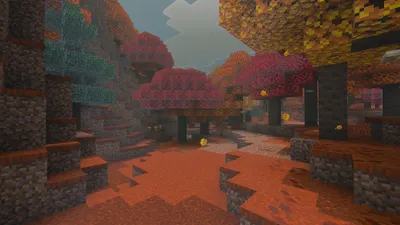
- The main menu panorama has changed: it now shows the Amber Grove biome and an abandoned camp. This is the first visual contact with the autumn biome from 26.3 right from the game's launch.
- The Adventure Mode icon, in the game mode selector, becomes a Treasure Map.
- A Realms intro screen appears automatically upon entering if a trial is available.
- Eating Chorus Fruit now displays particles in the direction of the teleport. This is a real readability improvement: you finally know where you're going to end up.
What's changing in gameplay
- The Drowned reverts back: Mojang is rolling back the behavior and animation changes made to the Drowned since the start of this development cycle. Those who found it fought oddly in melee will get the old one back.
- Enchantments now apply to items damaged because they're protecting an undead from the sun — in other words, a helmet placed on a zombie wears down while taking Unbreaking into account.
- Subtitles now point to the most recent sound within range, instead of staying on an old sound.
- Faster structure search and optimized terrain generation.
What's of interest to pack creators
- New
/computecommand, which evaluates aminecraft:number_providerin different contexts, withdefault,block <pos>andentity <selector>variants, an optional scale and an integer mode. - New
computesource for/data modify. - The
noneanimation type is reintroduced, which affects the/swingcommand as well as theminecraft:attack_animationandminecraft:interact_animationcomponents. - Data pack format bumped to 118.0, resource pack format to 97.0.
Installing the snapshot without breaking your world
The procedure hasn't changed: open the Minecraft launcher, enable snapshots in the Installations tab, then create a dedicated installation. Two precautions are worth repeating, especially with a snapshot that touches pack formats:
- Back up your worlds before touching them: a world opened in a snapshot cannot be reopened in an earlier version.
- Do not open your main world. Since the data pack and resource pack formats have changed, your custom packs will need to be updated.
Key takeaways
- Five maps renamed in English, no French translation in this snapshot.
- Thirty English labels with no French equivalent, including the entire Realms screen and two subtitles.
- In French, the same map already has two different names depending on whether it's blank or filled.
- The rest: Amber Forest panorama, Adventure Mode icon, Chorus particles, a rollback on the Drowned, and the
/computecommand.
Share this article
Does it bother you that the game displays labels in English in a snapshot, or do you think it's normal for the translation to follow afterward?
Frequently asked questions
Why does my map display in English when I have the game set to French?
Snapshots come out before translations do. Thirty English labels, including the names of the renamed maps, don't yet have a French equivalent in this snapshot. This is normal and temporary — localization catches up over the following weeks.
Will the French names of the maps change too?
Yes, but not in this snapshot. Mojang first needs to translate the new English names into French. In the meantime, the game displays English for the five maps concerned.
Is it a bug if my maps have two different names depending on whether they're filled in or blank?
No, this isn't a bug from this snapshot. It's an older French inconsistency: the game uses two different translation keys for the item and the filled-in map, hence the mismatched names.
Do I need to update my data packs and resource packs before playing this snapshot?
Yes, the formats move up to 118.0 and 97.0 respectively. Your custom packs need to be updated, otherwise they may not work properly.
Key takeaways
- The five Explorer maps get renamed in English to display the actual structure they point to — Ocean Monument Map, Woodland Mansion Map, etc.
- Thirty English strings have no French equivalent in this snapshot, which is normal but creates visual inconsistency until the next localization update.
- In French, the same map already has two different names depending on whether it's blank or filled in — a pre-existing consistency bug that worsens with these renamings.
- The Realms introduction screen automatically displays in English for lack of translation, with thirteen missing labels.
Comments
No comments yet. Be the first to react!
Leave a comment
Similar guides
Latest articles






Your opinion counts
Rate Minecraft
Click a star to rate