



 Fabian Lainé

Tips
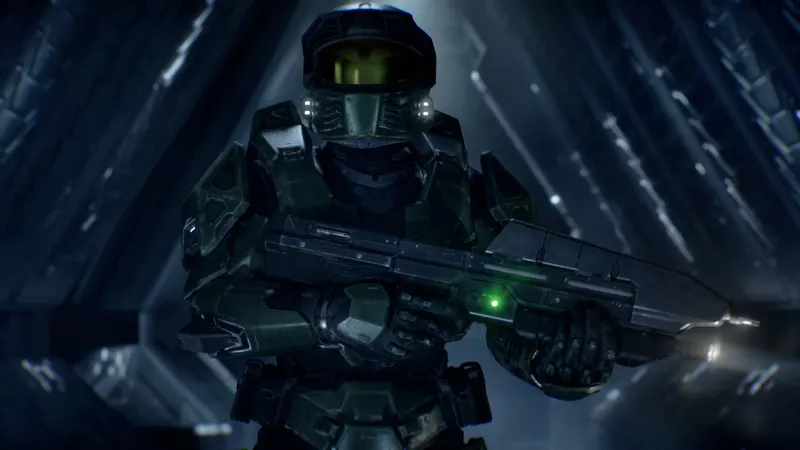
Halo: Campaign Evolved: the August 17 patch wipes your mission in progress — and fixes an assault rifle capped at 8.57 rounds per second
In brief
The August 17 patch for Halo: Campaign Evolved resets your in-progress mission — a hefty update of 8 to 29 GB depending on platform. It notably fixes an assault rifle capped at 8.57 rounds per second instead of 10, caused by a floating-point rounding error, and improves combat reliability against Jackals as well as overall game stability.
Halo Studios released yesterday, Monday, August 17, 2026, the biggest update to Halo: Campaign Evolved since its July 28 launch. Before installing it, a warning spelled out in full in the official patch notes: it resets your in-progress mission checkpoint.
Missions and checkpoints already unlocked remain accessible — you won't be starting from scratch. However, if you're halfway through The Library on Legendary, that run is lost. Finish the mission before installing the patch, or resume from the nearest checkpoint.
The rest is well worth the download, starting with a fix that the developers took the time to explain line by line: the assault rifle wasn't firing at the right rate of fire on Xbox and PC, and the cause boils down to a decimal point.
Between 8 and 29 GB to download, depending on where you play
Build 2026.08.11.1121610. The sizes announced by Halo Studios:
| Platform | Download |
|---|---|
| Xbox | 8 GB |
| PlayStation 5 | 12 GB |
| Steam | 17 GB |
| Microsoft Store / Xbox app on PC | 29 GB |
The 29 GB on the Microsoft Store isn't a typo: it really is three and a half times the size of the Xbox version for the same content.
The assault rifle was firing at 8.57 rounds per second instead of 10, because of a 6.0000048
This is the most interesting part of the patch notes, and it's written by the developers themselves. Halo's simulation runs at 60 ticks per second. A rate of fire expressed in rounds per second is converted into ticks per round: the assault rifle's intended 10 rounds/second therefore corresponds to 6 ticks per round.
Except that this value is stored in single-precision floating point, and the calculation returned 6.0000048. On the sixth tick, the comparison "6 ≥ 6.0000048" was false: the weapon didn't fire. On the seventh, "7 ≥ 6.0000048" became true. The result was a round every seven ticks, or 8.57 rounds per second.
The consequences were twofold, and one of them looked like an advantage. The weapon's spread — what the game calls gun error, shown by how far the reticle widens — is calibrated for the intended rate of fire. By firing more slowly, the error cone had time to close back up between shots: the weapon stayed accurate during sustained fire. It also dealt less damage, and the firing sound was out of sync with the shot itself.
PlayStation 5 was not affected: the bug stemmed from compiler optimizations that didn't affect all platforms the same way. Halo Studios notes that other weapons were affected "in subtle ways" and that the fix applies to all of them.
What this means for you: on Xbox and PC, the assault rifle now hits harder, but it no longer forgives holding down the trigger. Go back to short bursts.

Jackals finally stagger reliably, and Johnson no longer blocks "Boarding Action"
Three fixes directly affect gameplay:
- Jackals now get staggered "more reliably" when you target their hands and feet — the classic counter against the shield, which had worked inconsistently since launch.
- Sergeant Johnson receives several fixes in the mission "Boarding Action", one of the three brand-new missions in the Operation: METEORITE arc: some cases would flat-out block progression.
- Active Camouflage would deactivate on its own when falling off a ledge or passing over a bump. Fixed.
On top of that, there are ergonomic details that matter on Legendary: the Magnum now reloads correctly right after firing, and reloading the rocket launcher — as well as two weapons the patch notes only give in English, the Fuel Rod Cannon and the Needle Rifle — can now be interrupted by throwing a grenade.
Two achievement fixes, and the first one doesn't work in your favor
The first one closes a loophole: achievement progress is no longer wrongly granted when a restrictive skull or a difficulty modifier is active. In other words, progress the game used to credit you with by mistake will no longer be counted.
The second goes the other way, and it's a welcome fix: achievements earned offline weren't being granted upon reconnecting to Xbox network, forcing players to redo the unlock conditions all over again. That's now fixed.
For anyone chasing the platinum or the 1,000 G, the practical takeaway doesn't change: play with modifiers turned off. Ten of the game's achievements remain locked as soon as a difficulty modifier is active, whether on your own console or a teammate's — and yesterday's patch specifically removes the false progress that could make you forget that.
Three new visual settings, including a "None" option PC players had been asking for
Halo support's patch notes are only published in English; here are the menu paths and what they do.
- Chromatic aberration and film grain can now be toggled off separately, via Settings → Video → the Video Motion & Effects section. Halo Studios explains it wanted to bring back into the menus what PC players were already tweaking through config files, and to give consoles the same option. Note: since chromatic aberration is also used to signal a state (standing in a gravity lift, for example), part of the effect remains visible.
- A "None" option for the upscaling technique, via Settings → Video → the Advanced section → Upscaling Technique. Setting quality to Native removed upscaling, but the game kept applying image reconstruction and anti-aliasing. "None" cuts everything.
- An in-game account unlinking helper, via Settings → Account → Unlinking Help: the option opens the browser and starts the request. Since account linking is permanent on the cross-progression side, this exit door was sorely missing.
A free armor to claim, and a correction about what's actually being given away
The Recompilation armor customization is being given to all players. It doesn't drop on its own: you need to go to aka.ms/Recompilation, sign in with the Microsoft account you use to play, and enter the code ZS75-7UM8-C2BL-JE3D-4BFZ if it isn't already pre-filled.
Several outlets reported three armor sets being automatically credited. The official patch notes only mention one, and it requires redeeming a code. Take five minutes to claim it rather than waiting for it to just show up.
On PC and PS5, stability changes everything
On PC, custom keyboard shortcuts no longer reset when the game restarts. All supported AMD graphics cards now take advantage of Advanced Shader Delivery, which significantly reduces shader loading times and micro-stutters. And all graphics quality levels, from Very Low to Ultra, can now be selected regardless of hardware, whereas the game used to lock some of them depending on the detected machine class.
Frame generation now automatically switches off during cutscenes and re-enables in gameplay, to avoid jarring transitions. On PlayStation 5, Halo Studios reports fewer stutters in loaded areas and an overall higher frame rate.
One last reminder before you start the download: save your current mission by finishing it. That's the only thing this patch will cost you.
Share this article
Are you jumping back in right after the patch, or finishing your mission first?
Frequently asked questions
I'm halfway through a mission on Legendary. What happens to me?
Your progress in that mission will be lost. Finish it before installing the patch, or resume from your last rally point. Missions you've already unlocked, along with their rally points, remain accessible, so you won't be starting from scratch.
Why was the assault rifle firing at 8.57 rounds per second instead of 10?
A single-precision floating-point calculation was returning 6.0000048 instead of 6. On even ticks, the weapon simply wouldn't fire — the result was one shot every seven engine ticks instead of six, or 8.57 rounds per second. It was a compiler optimization bug present on Xbox and PC, but not on PS5.
Does this Recompilation armor really get added to my account automatically?
No. You need to go to aka.ms/Recompilation, sign in, and enter the code ZS75-7UM8-C2BL-JE3D-4BFZ. Don't count on automatic syncing — take five minutes to claim it rather than waiting for it to show up.
I play on PC with an AMD card, what actually changes for me?
Advanced shader delivery drastically cuts shader loading times and stuttering. On top of that, every graphics tier from Very Low to Ultra is now selectable — the game no longer locks settings based on your machine's class.
On PlayStation 5, will I see significant performance gains?
Halo Studios claims less stuttering in loaded areas and an overall higher frame rate. Nothing revolutionary, but the experience should be more stable than before.
Key takeaways
- Finish your mission before installing the patch: it wipes your in-progress checkpoint, but your rally points remain accessible
- The assault rifle was firing 14% slower due to a 0.0000048 floating-point inaccuracy — a fascinating bug that paradoxically made the weapon more precise
- Jackals now properly stagger when you target their hands and feet, a counter that worked inconsistently since launch
- The download weighs in at 29 GB on Microsoft Store, three times heavier than on Xbox — an anomaly that isn't one
- On PC, AMD cards finally benefit from advanced shader delivery, and you can unlock every graphics tier regardless of your hardware
Comments
No comments yet. Be the first to react!
Leave a comment
Similar guides




Latest articles







Your opinion counts
Rate Halo: Campaign Evolved
Click a star to rate