



 Fabian Lainé
Full Guide
Tomodachi Life: Dream Studio for Your Stories and Short Films
In brief
Tomodachi Life: Living the Dream transforms your island into a full-fledged production studio thanks to the "Dream Studio" — a suite of creative tools bringing together the Photo Studio, the Creation Workshop, the Island Builder, and customizable shows. This guide breaks down every feature and offers four ready-to-shoot scenarios for creating your own Mii short films without any external software.
The subtitle Living the Dream is not just decorative: it also points to the game's newest calling, that of becoming a mini production studio in the player's hands. By bringing together the Photo Studio, the Creation Workshop, the Island Builder and the new customisable shows, Nintendo turns your island into a film set for your Miis. This guide details everything this « Dream Studio » — the nickname the French-speaking community already gives to this set of tools — really allows you to do, with the official French names verified on nintendo.com/fr-fr, and offers four ready-to-shoot scenarios for your Mii short films on Nintendo Switch 2.
What exactly is the « Dream Studio »?
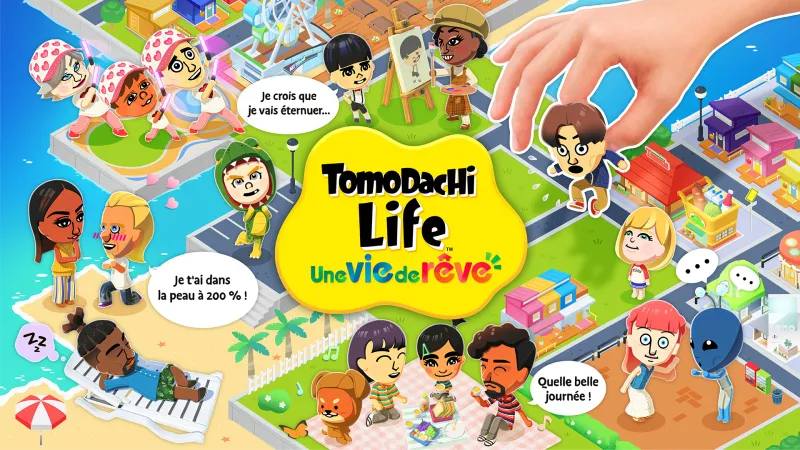
Contrary to what English-language press coverage suggests, Tomodachi Life: Living the Dream does not offer a single screen called « Dream Studio ». Instead, the expression should be understood as the generic name that French-speaking players give to the game's creative suite: the combination of the Photo Studio (Foto-Tomo in international guides), the Creation Workshop, the Island Builder, the Little Quirks, and the unique shows that can be designed for your residents. It is this set of tools, exclusive to this new instalment, that now lets you stage a complete story — costumes, set, improvised dialogue, poses, framing — and then turn it into a series of photos or a video capture. In other words, a genuine amateur short film workshop built into the game, with no need for external editing software.

Photo Studio (Foto-Tomo): your ready-to-film set
Unlocked once your Miis' happiness level reaches an already advanced threshold (around twenty-five according to data from the international version), the Photo Studio — called Foto-Tomo in English guides — is the heart of the feature. First you choose the number of Miis present on screen, up to six, then you select a background: either a real location on your island (beach, Town Hall square, Wedding Chapel, Ferris wheel), or a setting imagined for the scene. You then adjust the poses, the facial expressions individually or as a group, the camera angle, and apply a filter. The final result is saved in an album accessible directly from the HOME Menu on Nintendo Switch and Nintendo Switch 2, which makes exporting via native sharing features easier.
Creation Workshop: bespoke sets, outfits and shows
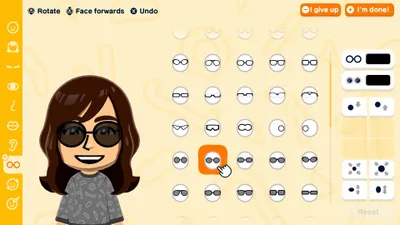
The Creation Studio is the other pillar of the system. Nintendo France describes it as follows on its official product page: “Draw house fronts, floor tiles, clothes and animals, or whip up culinary creations.” In concrete terms, every object you draw can then be injected into the world: the repainted front becomes a resident's house, the pattern you drew is printed on a dress worn at the Chapel, the invented animal becomes a Mii's pet. Even more interesting for a short-film project: the studio allows you to create unique shows for your Miis — a mini video format broadcast inside the game, which your residents watch like a real programme. This is where the shift towards “fiction” happens most naturally.

Island Builder: your grand outdoor set
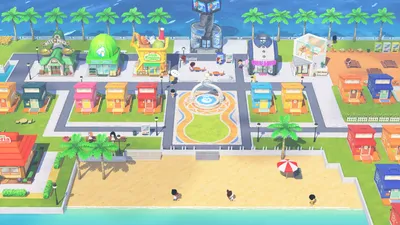
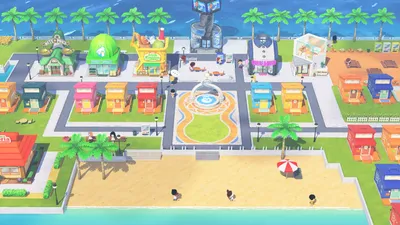
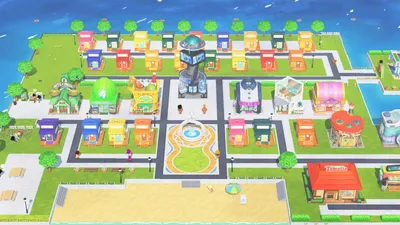
The third tool in the trio is the Island Builder. The developers confirm this in Ask the Developer, Vol. 21: this new feature “lets players freely customise the island where the Miis live”. Whereas the 3DS Tomodachi Life confined every interaction to a self-contained scene, Living the Dream opens up the space: you move buildings, landscape the terrain, add street furniture and play with the topography. For a short-film project, this means you can put together a complete set before shooting even begins. Place the Wedding Chapel right next to the Wishing Fountain for a long take on the declaration; isolate a small dark house at the end of a path for your horror film; line up the Restaurant, the Town Hall and the Ferris wheel in depth for a tracking shot.
Scenario 1 — The romantic comedy
This is the game's most natural genre, given how inherently narrative the flirting mechanics already are. To build your short film, work through the official relationship stages one by one: Acquaintances, Slight interest, Friends, Romantic feelings, Secret love. At each stage, capture a key scene at the Photo Studio: a first meeting At her place, a one-on-one At the restaurant, a suspended moment On the Ferris wheel, a wish thrown into the Wishing Fountain, then the big scene at the Wedding Chapel. Use the Creation Studio to design the dress and the wedding suit — genuine costume-designer work — and bring in the line “I've got you under my skin 200%!” before the exchange of vows. A happy ending is guaranteed, complete with the cherubs that appear as a reward.

Scenario 2 — The horror film
The genre seems unlikely in such a gentle game, and it's precisely this contrast that makes the result memorable. Here you'll repurpose two of the game's mechanics. First, Quirks — this option, confirmed in the Developer Interview, Vol. 21 — Chapter 3, lets you give a Mii a strange behavior (zombie walk, levitation, odd eating habits). Give an unsettling one to your "antagonist" and let the effect do its work. Second, the Creation Workshop: draw a decrepit house facade, a black cat, a ghostly white dress pattern. Then follow up with sessions at the Photo Studio using a nighttime background, frozen expressions, and a low-angle shot. Finish with a one-off show made in the workshop: a fake news flash aired At Home, announcing a disappearance on the island. The mood shifts instantly.
Scenario 3 — The Cooking Show
The third creative pillar is culinary creations. The Creation Workshop lets you design a dish from scratch: the shape of the dish, the ingredients, the colors. Once validated, the dish is added to the game's catalog and your Miis can enjoy it At the Restaurant. So put together three original recipes — a starter, a main course, a dessert — designate a "chef" Mii wearing the apron from the official clothing catalog, and follow up at the Photo Studio with a series of shots: a cutting shot, a plating shot, a tasting shot with a "delighted" expression. Bring in the enthusiastic line "Go for it!" at the moment of the first bite. You end up with the perfect pilot for a little cooking show to later broadcast on the island as a one-off show.

Scenario 4 — The Sports Short Film
For a "sports" action film, the Photo Studio becomes your editing bench. Two Miis in matching outfits — designed in the Creation Workshop — meet at the Town Hall for an impromptu challenge, then travel across the island in the following order: the beach for the race, the Restaurant for the pre-match break, the Ferris Wheel for the doubt scene, back to the main square for the finale. At each stage, a short photo session is enough to tell the story of the progression. Use low camera angles and saturated filters here to add energy. Finish with a one-off show in the style of a "sports bulletin," designed after the model of the game's news flashes, to announce the victory to the rest of the island. Editing, in Living the Dream, is all about the rhythm of Quirks and the choice of locations.
Sharing Your Short Films in 2026
Nintendo is cautious about sharing player-generated content, and it's worth knowing before you dive in. Reviews of the game, particularly from the French-speaking press, point to sharing restrictions that limit direct export: photos first go into the HOME Menu album, then pass through the console's native channels. The good news on Nintendo Switch 2 is the presence of GameChat, the feature that lets up to twelve players chat via voice while playing, with four of them able to share their screen simultaneously using a compatible USB-C camera. In practice, your short film gets shared live during a session — you play out your scene, your friends watch. For the Switch 2 version, there's also a portable resolution of 1080p (versus 720p on Switch 1) and shorter loading times, which noticeably speeds up going back and forth between the Photo Studio and the Workshop.
Staging tips to take things further
Here are a few tips to add depth to your Mii short films. One, always prepare your costumes and sets before filming: nothing kills the pace more than a trip back to the Workshop mid-session. Two, make use of the Mii Info — the little panel that reminds you of each resident's identity — to give your protagonists a coherent backstory; the developers almost cut this feature, so keeping it is a gift for storytellers. Three, play with the 16 personalities available when creating a Mii: a "nervous" antagonist won't react the same way as a "laid-back" friend, and your scenes will feel more authentic as a result. Four, always keep a "cameraman" Mii in your cast: this is the one who'll appear as a bystander in the background of the shot and make your close-ups more believable.
Finally, two points remain worth watching over the course of 2026. First, the storage capacity of the HOME album for saving captures: press reviews mention a storage limit that may feel short for a lengthy project. Second, the possible arrival of a real video export tool — Nintendo has not confirmed this for now. In the meantime, the best strategy remains to capture each scene as a photo and tell your story as a photo novel on compatible Nintendo networks, rather than hoping for native video editing. A dream studio, yes, but with its own rules.
The subtitle A Dream Life takes on its full meaning here: far from a simple graphical update, the 2026 version turns Tomodachi Life into a genuine narrative sandbox. Between the Photo Studio, the Creation Workshop, the Island Builder, Quirky Habits, and unique shows, you have everything you need to shoot your first Mii short film starting today — romantic comedy, horror film, cooking show, or sports drama. The only real hurdle remains sharing, which for now will require you to go through the HOME album and GameChat. Open the Studio, choose your cast, design your sets: your first scene awaits.
Share this article
What kind of short film would you try first?
Frequently asked questions
What exactly is the "Dream Studio"? A single screen?
No, it's the name the French-speaking community gave to the game's entire set of creative tools: Photo Studio, Creation Workshop, Island Builder, Quirks, and customizable shows. Each one works independently, but they all revolve around a single goal: telling a story with your Miis from start to finish.
At what point in the game do you unlock the Photo Studio?
Once your Miis' happiness level reaches an advanced threshold, roughly twenty-five according to international data. So you'll first need to invest time in relationships between residents.
Can I really create my own sets and clothing?
Yes, the Creation Workshop lets you design from scratch: house fronts, clothing patterns, food creations, even pets. Everything you create is injected directly into your island, and your Miis can use it.
Do I need external editing software to turn my photos into a video?
No, the game offers unique shows that you create in the Workshop and that air on the island like real programs. As for raw photos, they export natively via the Switch's HOME menu.
Are these four film scenarios tutorials or flexible ideas?
They're framework ideas ready to be adapted. The romantic comedy follows the official relationship milestones, the horror film plays on Quirks to create contrast, the cooking show starts from food creations — feel free to reinvent each approach.
Key takeaways
- The Photo Studio unlocks true creative potential: up to six Miis on screen, free-form sets, adjustable poses, and filters to turn every shot into a real staged scene.
- The Creation Workshop pushes detail to an obsessive level — design clothing, building fronts, pets, and even unique shows that Miis watch like real programs.
- The Island Builder breaks free from the confinement of the 3DS Tomodachi Life: lay out your sets in advance, placing buildings and terrain freely to structure your shoot.
- Four proven scenarios await: the five-act romance, horror through contrast, the cooking pilot, and the sports short film — each one uses the tools in a radically different way.
- Everything exports natively to the Switch's HOME menu — simplified sharing, with no need for external editing software.
Comments
No comments yet. Be the first to react!
Leave a comment
Similar guides
Latest articles







Your opinion counts
Rate Tomodachi Life: Living the Dream
Click a star to rate