



 Fabian Lainé

Tips
The Sims 4: the August 25 update caches the Marketplace — the command to clear it, and where the folder grows on your disk
In brief
The August 25, 2026 update for The Sims 4 transforms the Marketplace by implementing an image caching system that writes to your disk, up to a maximum of 250 MB, with a cheat command to clear it in case of issues. The patch also adds 16 free items in Create a Sim: six inclusive clothing pieces, five preset looks, and five starter Sims inspired by natural hairstyling art.
Maxis rolled out an update to the Sims 4 base game on Tuesday, August 25, 2026: 1.127.41.1030 on PC, 1.127.41.1230 on Mac and 2.38 on console. It doesn't add a pack, but it changes two concrete things: the way the Marketplace loads its images, and the free content available in Create a Sim.
The first point deserves a guide of its own, because it now writes files to your disk and comes with a cheat command that most players will never open.
The image cache: what really changes
Until now, Marketplace images were redownloaded every visit. Now, they're cached after the first download, and the game only retrieves what's new or changed.
In practical terms: back-and-forth trips through the Marketplace become faster, at the cost of a folder that grows on your machine. Maxis gives the exact limits:
| Setting | Announced value |
|---|---|
| Cache cap | 250 MB ("actual space used will generally be lower") |
| Automatic upkeep | 14 days after the last Marketplace visit |
| What upkeep does | Deletes unused images and frees up space |
Clearing the cache manually: the command
If Marketplace images display incorrectly — missing thumbnails, visuals that no longer match the pack — Maxis provides the steps to follow. Open the cheat console and type:
clearonlinethumbnailcache true
On PC and Mac, the folder can also be accessed directly:
Documents\Electronic Arts\The Sims 4\onlinethumbnailcache
On PlayStation and Xbox, this folder isn't accessible: the cheat command remains the only option.
Note: the cheat console opens with Ctrl + Shift + C on PC. Unlike most codes, this one doesn't touch your save or your achievements — it only purges image files.
16 free additions to Create a Sim
The update adds base game content, meaning free for everyone, with no pack required. The exact tally, as presented by Maxis:
- 6 Create a Sim items designed to showcase Sims of all body types: a versatile dress, tops, jeans, cardigans, shirts and pants;
- 5 preset outfits (Styled Looks) built around these pieces, to serve as a starting point;
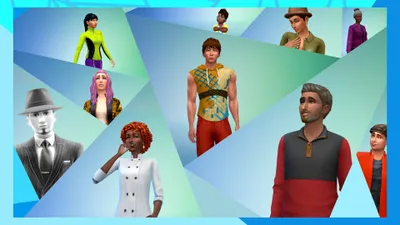
- 5 starter Sims created to wear them — they're in Create a Sim and in the Gallery, so they can be grabbed directly into an existing world.
Added to this is an afro hairstyle inspired, Maxis writes, "by the art of natural hair sculpting." It's the only hairstyle addition in this update.
The fixes, and the two that concern consoles
On PC, only one fix is listed: the layout of Marketplace pages now displays correctly again when entering from Create a Sim after installing a pack obtained via Quick Buy.
On console, two more significant fixes:
- PlayStation — one of the main crashes at game launch has been fixed. Maxis explicitly thanks the players who submitted reports through PlayStation's reporting system, which indicates this was a crash that was difficult to reproduce internally.
- Controller — controls no longer freeze when scrolling with the right stick, whether in the Marketplace opened from Create A Sim, or in pack detail pages.
Checking that you have the update
\n\nThe free content doesn't appear if the game isn't up to date, and on console the numbering doesn't look like the PC one. The three numbers to look for:
\n\n| Platform | Version after update |
|---|---|
| PC | 1.127.41.1030 |
| Mac | 1.127.41.1230 |
| PlayStation and Xbox | 2.38 |
On PC and Mac, the number is displayed in the bottom right corner of the home screen. If it's lower than 1.127.41, the game hasn't received the patch yet: neither the hairstyle, nor the starter Sims, nor the image cache will be present.
\n\nWhat order to troubleshoot a stubborn Marketplace
\n\nCaching adds a layer between you and the images, and so one more potential point of failure. If the Marketplace shows blank, misplaced, or outdated thumbnails, proceed in this order rather than at random:
\n\n- \n
- Quit and relaunch the Marketplace: most missing thumbnails are simply an unfinished download. \n
- Run
clearonlinethumbnailcache truein the cheat console. This is the only action Maxis explicitly documents for this issue. \n - On PC or Mac, check that the
onlinethumbnailcachefolder fills back up after the purge. If it stays empty, the problem lies elsewhere — write permissions, a full disk, or cloud sync on the Documents folder. \n - Don't delete the folder by hand as long as the command works: it does the same job without risking taking a neighboring file with it. \n
On console, only the first two steps are possible — and the fix for the right stick freeze should already remove a good part of the symptoms attributed to the Marketplace.
\n\nWhat about the two August 27 kits
The same announcement reminds us that the Mean Girls Capsule Kit and Clueless Capsule Kit kits release on August 27, 2026. We covered them in detail on August 21; nothing has changed since then, and EA still hasn't given them a French name.
They are paid and have nothing to do with the free content described above: the dress, the cardigans, the hairstyle, and the 5 starter Sims come with the patch, not with the kits.
What to do after the update
- Open the Marketplace once: it's this visit that fills the cache, and so it's the one that will be slow.
- If a thumbnail starts lying about what it shows, run
clearonlinethumbnailcache truebefore looking any further. - On a tight disk, keep in mind the 250 MB cap and the automatic cleanup at 14 days — a player who no longer reopens the Marketplace gets their space back on their own.
- Go through the Gallery to grab the 5 starter Sims without going back through Create A Sim.
Maxis publishes these notes in English only. The interface labels used here are those of the English client ("Create a Sim," "Gallery," "Marketplace," "Quick Buy"). The two kits keep the names EA gave them.
Share this article
Does the Marketplace cache help you or annoy you?
Frequently asked questions
Why does the Marketplace show empty or outdated thumbnails after the update?
The new caching system can leave orphaned files behind. Start by restarting the Marketplace, then run clearonlinethumbnailcache true in the cheat console if the issue persists. On PC or Mac, you can check that the onlinethumbnailcache folder is filling up again.
How much disk space will the Marketplace cache eat up?
250 MB maximum according to Maxis, with an average that's usually lower. The game automatically cleans up unused images 14 days after your last visit to the Marketplace, so you get the space back on your own if you don't return.
Where exactly is the cache folder located on my computer?
On PC and Mac, it's Documents\Electronic Arts\The Sims 4\onlinethumbnailcache. On PlayStation and Xbox, the folder isn't accessible: the only option remains the cheat command.
Will using clearonlinethumbnailcache true mess up my save?
No, it's a harmless command that only purges the Marketplace's image files. It doesn't touch your save file or your achievements—it's as safe as clearing a temp folder.
How do I get the 5 starter Sims without going through Create a Sim?
They're published directly on the Gallery, so you can download them and place them in an existing world without having to deal with the creation interface.
Key takeaways
- The Marketplace image cache now writes to your disk after the first visit, speeding up subsequent reloads.
- Type clearonlinethumbnailcache true in the cheat console to purge missing or misleading thumbnails.
- The cache caps at 250 MB and cleans itself automatically 14 days after your last visit to the Marketplace.
- 16 free items are coming for all players: inclusive clothing, looks, and five ready-to-use Sims.
- On PC, make sure you're running version 1.127.41.1030 or higher; on console, it should be 2.38.
Comments
No comments yet. Be the first to react!
Leave a comment
Similar guides

Latest articles







Your opinion counts
Rate The Sims 4
Click a star to rate