



 Fabian Lainé

Beginner's Guide
The Sims 4: Complete Create-A-Sim (CAS) Guide to Building a Sim
In brief
The CAS in The Sims 4 is the ultimate workshop for shaping your characters: body shape, face, clothing, voice, walk style, and personality traits. This guide covers every step to create a unique Sim, from direct 3D sculpting to managing family relationships, as well as the EA Gallery for finding inspiration.
Twelve years after its initial release in September 2014, The Sims 4 remains the most-played life simulator in the world, and that owes a great deal to its Create a Sim mode — the famous CAS. It's the virtual workshop where you sculpt the face, body, wardrobe and identity of your characters before letting them loose in the world. Whether you want to create your own alter ego, a French celebrity, or an entire family of fantastical characters, this guide walks you step by step through The Sims 4's Create a Sim mode.
Opening CAS: where to start
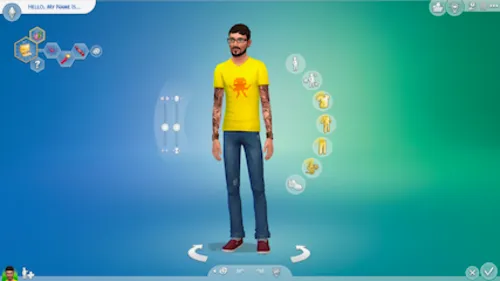
Create a Sim mode can be accessed in two ways. From the main menu, click "New Game," then choose "Create a New Household": CAS opens immediately with a blank Sim standing in front of their mirror. The second entry point goes through Manage Households, also accessible from the menu — there you can edit, duplicate or delete existing families, and you can reopen CAS to add, remove or edit a household member.
The Sims 4's CAS was completely redesigned in 2014 to do away with the side sliders inherited from The Sims 3 and introduce direct manipulation: you click, drag and mold. A bit like playing with digital clay.
Note: since the June 2016 update, the barrier between masculine and feminine creations has been removed. You can switch between clothing and hairstyle categories at will, regardless of your character's displayed gender.

Body shape: sculpting the body
To the left of your Sim, two vertical sliders control body build: the first adjusts weight (from very slim to heavyset), the second muscle tone (from slight to athletic). Beyond these two settings, everything is done through direct manipulation. Click on a shoulder, an arm, a hip, a calf, and drag the mouse: the area stretches, shrinks, or rounds out in real time.
The game offers roughly a hundred body-shaping settings: 18 body modifiers at the general level, 35 for the face and 44 for detail editing. This granularity makes it possible to faithfully reproduce a real-life silhouette or, conversely, to invent a completely unique physique. Right-clicking on a body part often brings up presets, which are very handy for working quickly.
The face: features, complexion and details
The face is the richest area of CAS. Double-clicking on an area (eyes, nose, mouth, ears, jaw, forehead) unlocks advanced editing mode and reveals additional manipulation handles. You can bring the eyes closer together, raise the cheekbones, refine the bridge of the nose, or plump up the lower lip — each gesture reshapes the 3D sculpt in real time.
The right-hand side menu then brings together the cosmetic elements: skin tone with a wide range of shades (including a dedicated shade slider), hairstyles sorted by length, hair color (roots included), makeup by area (foundation, blush, eyeliner, mascara, lipstick), eyebrows, tattoos and scars. Each element can be given a color palette or a specific pattern, with additional variations unlocked through expansion packs and kits.
Clothing and style: the eight categories
Once your Sim has been shaped, it's time for the wardrobe. The Sims 4 splits the closet into eight distinct categories, each corresponding to a situation your character might experience:
- Everyday: the default outfit, worn during the day;
- Formal: wedding, gala, ceremony;
- Athletic: gym, jogging, yoga sessions;
- Sleep: pajamas, nightgown;
- Party: clubbing, get-togethers with friends;
- Swimwear: pool, beach, sauna;
- Hot: fall, winter, snowy expeditions;
- Cold: summer, desert climate.
Each category allows up to five outfits, which the game rotates randomly. A "Style" tab lets you quickly filter by vibe (boho, goth, trendy, casual), and the "Apply to All" button propagates a piece of clothing or an accessory across every outfit — a considerable time-saver if you want a Sim to always wear the same pair of glasses or the same necklace.

Voice and walk: the living touch
A Sim isn't just a static silhouette. Three voice tones (warm, melodic, clear) are available for each gender, with a pitch slider to fine-tune the range. The walk, meanwhile, offers eight styles: standard, perky, snooty, confident, feminine, goofy, swagger, and slow. The choice genuinely changes how a Sim carries themselves around town: a snooty character walks with their chin held high, while a "goofy" Sim struts about with exuberance.
Try out several voice + walk combinations before confirming: two physically identical Sims can end up feeling completely different once you play them, just by changing these two settings.
Identity: name, age, and gender
The identity panel gathers the first name, last name, and biography (a short blurb shown on the selection screen). Seven age groups can be selected: baby, toddler, child, teen, young adult, adult, and elder — each stage unlocks or locks certain CAS options (children, for example, don't have access to gender customization).
Since the June 2, 2016 update, CAS offers extremely flexible gender customization: masculine or feminine frame, choice of restroom used, the ability to become pregnant or get someone pregnant, and the ability to wear any clothing regardless of the displayed sex. These options appear via the gear icon next to the gender symbol. The game also covers sexual preferences and romantic attraction through more recent updates.
Three traits, one aspiration: personality
On the right side of the screen, two buttons open the Aspiration and Traits windows. A young adult or adult chooses an aspiration (which grants a bonus trait) and up to three personality traits; a teen chooses two, a child chooses one, and a toddler selects a separate "toddler trait." These choices shape your Sim's reactions, wants, and social interactions throughout their life.
We cover each option in detail in our dedicated guides: check out our personality traits guide and our aspirations guide to find out which combinations to prioritize.
Creating a family and setting relationships
The “Add a Sim” button (the “+” icon at the bottom of the screen) lets you expand the household to up to eight members, human or pet. A contextual menu then defines the family relationships: spouse, partner, parent, child, sibling, or unrelated roommate. This way you can build a classic household (married couple + children), a group of friends sharing a home, a single-parent family, or a lone Sim.

Editing an existing Sim: mirror and cheat code
Once the game has started, it's still possible to tweak a Sim. The “clean” method is to click on a mirror or a dresser and choose “Change Appearance” — this reopens a restricted version of CAS (clothing, hairstyle, makeup).
To go further (traits, age, full body shape, or even editing a ghost Sim), you need to enable cheat codes with testingcheats true, then type cas.fulleditmode. Shift + clicking on the Sim then offers the “Modify in CAS” option. We cover this process in detail in our cheat codes guide.
Always save your game before using cas.fulleditmode: some changes (age, gender) can have cascading effects on relationships and ongoing pregnancies.The EA Gallery: downloading community creations
If CAS feels intimidating or you're short on inspiration, the EA Gallery — accessible from the main menu or the dedicated in-game button — provides millions of Sims and households created by the community. A search engine filters by name, tag, popularity, or official Maxis creations. A single click is enough to download a Sim and place it directly into your CAS or your world.
The Gallery is also the place to share your own creations: give them a title, a description, a few tags, and make them public. In doing so, you feed the creative loop that has kept the Create a Sim mode alive for twelve years.
Going further
CAS is just a gateway. Once your Sims are created, dive into our other Playnews guides dedicated to the game: personality traits guide, aspirations guide, occults guide (vampires, mermaids, spellcasters), cheat codes guide, money guide, building guide, and skills guide. Happy creating, and above all: don't forget to save your household in the library before letting it loose in the open world of Willow Creek or Oasis Springs.
Share this article
What takes you the most time in CAS?
Frequently asked questions
Can I completely modify a Sim after starting the game?
Yes, in two ways. The simplest: click on a mirror or a dresser to select 'Change Appearance' and tweak clothing, hairstyle, and makeup. For full editing (traits, age, body shape), enable cheat codes (testingcheats true, then cas.fulleditmode) and Shift + click on the Sim. Note: save your game beforehand, as certain age or gender changes can affect ongoing relationships.
What's the maximum number of Sims I can add to a household?
Up to eight members, human or animal. You define family relationships through the context menu: spouse, partner, parent, child, sibling, or unrelated roommate.
Can I wear any clothing regardless of my Sim's gender?
Exactly. Since June 2016, the gender barrier has been removed. You can switch between clothing and hairstyle categories freely, independent of the displayed gender or chosen body frame.
Where can I find inspiration if I get stuck creating my Sim?
The EA Gallery (accessible from the main menu or in-game) offers millions of Sims and households created by the community. You can filter by name, tag, popularity, or official Maxis creations, and download whatever you like with a single click.
Do voice and walk style actually have a real impact on gameplay?
Yes, radically so. Two physically identical Sims will sound and behave very differently in practice. A snobbish Sim walks with their chin held high and a clear voice, while a 'goofy' Sim struts around exuberantly. Try out several combinations before settling on one.
Key takeaways
- CAS works through direct manipulation (click-and-drag) and offers around a hundred morphological settings to shape the body and face in real time.
- Clothing is organized into eight situational categories (everyday, formal, athletic, sleepwear, party, swimwear, hot weather, cold weather), each accepting up to five random outfits.
- Voice and walk style radically transform a Sim's attitude: three vocal tones and eight walk styles let you create two physically identical clones who feel completely different in practice.
- Since 2016, gender customization has been extremely flexible: masculine or feminine frame, choice of bathroom use, and the ability to get pregnant or impregnate, all independent of the displayed gender.
- Traits and aspirations determine your Sim's emotional reactions and social interactions, a crucial choice made at creation that lasts throughout their entire life in the game.
Comments
No comments yet. Be the first to react!
Leave a comment
Similar guides
Latest articles








Your opinion counts
Rate The Sims 4
Click a star to rate