



 Alexandre Jollier


Full Guide
Halo: Campaign Evolved - how to claim your pre-order bonuses
In brief
Halo: Campaign Evolved offers free pre-order bonuses for any version purchased (Foundry Armory Pack with 4 cosmetics), while the Premium Edition at 69.99 € adds 5 additional armor skins, 6 weapon skins, digital content, and most importantly 5 days of early access. Redemption is simple: just sign in with the right Microsoft account and head to the Customization tab in-game.
Just booted up Halo: Campaign Evolved and want to claim your pre-order skins or Premium Edition bonuses - or simply wondering if they're worth the extra 20 euros? Here's everything you need to know, in order.
The pre-order bonuses: the Foundry Armory Pack
Whichever version you buy, pre-ordering gives you access to the Foundry Armory Pack. Four cosmetics in total: two armor skins and two assault rifle skins, each in two distinct colorways.
- Classic 2001 Mark V Armor Skin
- Classic 2001 Assault Rifle Skin
- Gilded Onyx Armor Skin
- Gilded Onyx Assault Rifle Skin
The Classic 2001 skin is clearly the one aimed at longtime fans: Master Chief as he looked on the original Xbox, low polygon count included. It's a genuine nostalgia trip for anyone who played Halo CE at its 2001 launch. No early access with the standard version, but these cosmetics are there from day one.

The Premium Edition: is it worth the extra 20 euros?
The Premium Edition is priced at €69.99, which is 20 dollars more than the standard version. It includes all the pre-order bonuses and adds a significant amount of cosmetic content, plus a few digital extras.
Additional armor skins:
- Lochagos Armor Skin
- Timberwolf Armor Skin
- Splintered Warden Armor Skin
- Mobile Armor Type 117 Armor Skin
- Gestalt Armor Skin
Additional weapon skins:
- Laconian Lance Battle Rifle Skin
- Savage Tooth Sniper Rifle Skin
- Subanese Fang Energy Sword Skin
- Prototype SPNKR Rocket Launcher Skin
- Colossus Fuel Rod Skin
- Cold Iron Magnum Skin
Bonus digital content:
- Digital artbook
- New short story Halo: Hungry Buzzards
- Digital game manual
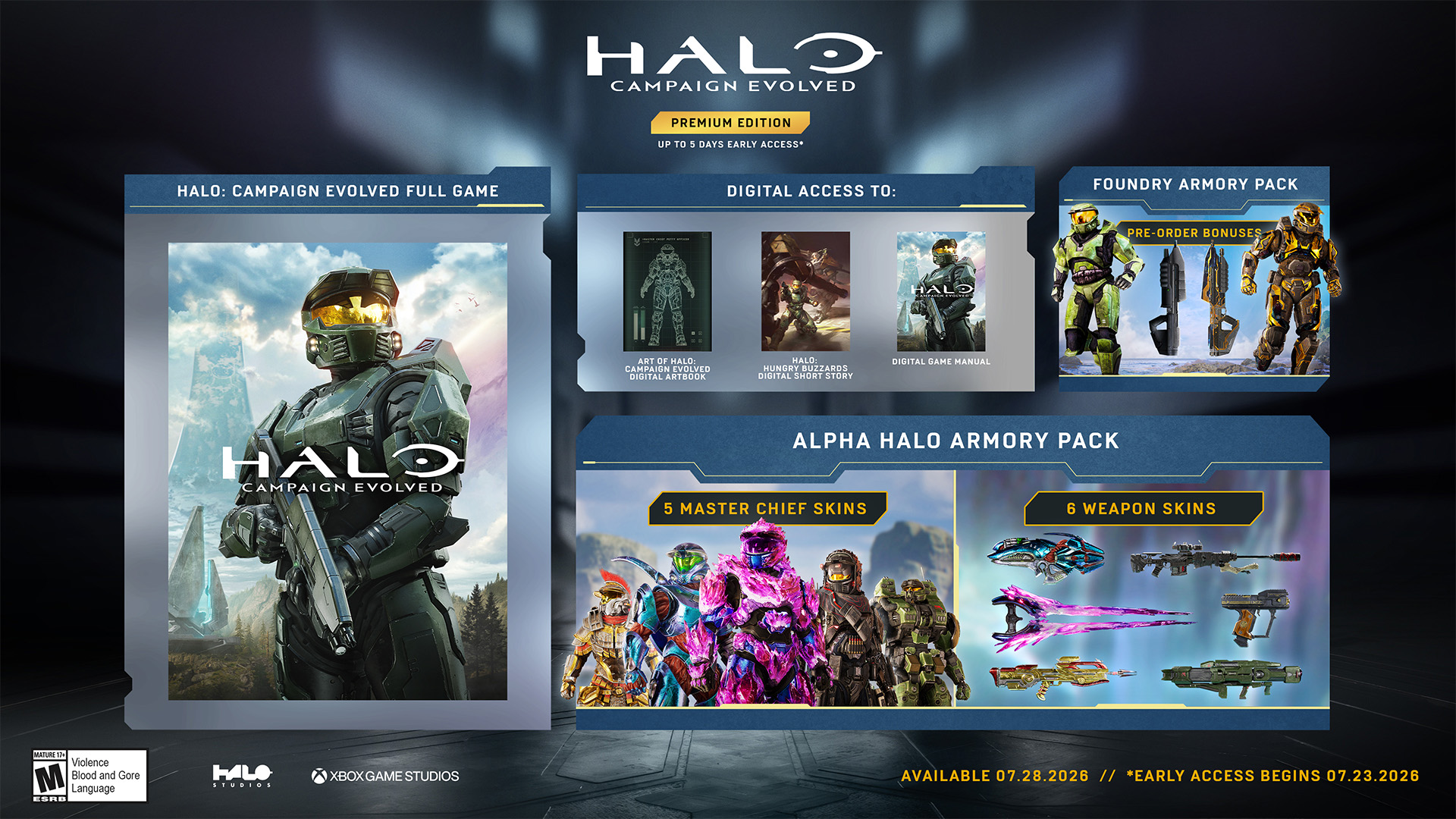
And above all: 5 days of early access. If you're reading this before the official release on July 28, 2026, the Premium Edition gives you access to the game right now. That's often the deciding factor that tips the scale.
Honestly, if the cosmetics leave you cold and you don't need early access, the standard version is more than enough. But for hardcore fans, or those who want to cover as many weapons as possible with skins from launch - 6 weapon skins for 20 euros isn't bad at all.
How to claim and activate your bonuses in-game
Nothing complicated here, but there's one important requirement: your Microsoft account must be the same one used to purchase the game. If you're signed in with a different account, your cosmetics won't show up.
- Launch Halo Campaign Evolved and sign in to your Microsoft account from the start menu.
- On the main screen, select Customization.
- Browse the Armor and Weapons tabs to find your skins.
- All cosmetics tied to your purchase should be available right away - no code to enter, no extra steps.
What if your skins don't show up?
The first thing to check is the linked Microsoft account. That's the number one cause of issues like this on Xbox/PC games. Sign out, sign back in with the right account, and relaunch.

Share this article
Do you think the Premium Edition, at 20 euros more, is worth it?
Frequently asked questions
Do I need to pre-order to get the Foundry Armory bonuses?
Yes, but it's free with any version purchased as a pre-order. You get all 4 cosmetics automatically, no code needed.
Is the Premium Edition really worth the extra 20 euros?
That depends on you. If cosmetics leave you cold and you don't need early access, the standard version is enough. But for hardcore fans who want to cover as many weapons as possible right from launch, 6 weapon skins for 20 euros is decent.
How do I redeem my skins in-game?
Launch Halo Campaign Evolved, sign in to your Microsoft account from the start menu, go to Customization, and find all your skins under the Armor and Weapons tabs. No code required.
My cosmetics aren't showing up, what do I do?
First check that you're signed in with the Microsoft account used to purchase the game. That's the number one cause. Sign out, sign back in with the correct account, and relaunch the game.
What exactly is the Classic 2001 skin?
It's Master Chief in his original Xbox version, with a low polygon count, a real nostalgia trip for those who played Halo CE back in 2001. You get it automatically through the pre-order.
Key takeaways
- The Foundry Armory Pack is free with any pre-order: two armor skins and two assault rifle skins, including the nostalgic Classic 2001 version.
- The Premium Edition costs 20 euros more and adds 5 additional armor skins and 6 weapon skins, plus bonus digital content.
- The 5-day early access is often the deciding factor for the Premium Edition if you want to play before the official release.
- Cosmetic redemption is automatic in-game: just make sure your Microsoft account matches the one used for the purchase.
- If the skins don't show up, sign out and back in with the correct Microsoft account - that's almost always the issue.
Comments
No comments yet. Be the first to react!
Leave a comment
Similar guides






Latest articles







Your opinion counts
Rate Halo: Campaign Evolved
Click a star to rate