



 Alexandre Jollier


Beginner's Guide
Paralives Guide: How to Add Items to Your Inventory
In brief
This guide teaches you how to master inventory in Paralives, an essential step to optimize your gaming experience. Discover how to access build mode, select and add items to your inventory, then manage them efficiently while taking space and money limits into account.
In Paralives, optimizing your inventory is one of the keys to a successful gaming experience. This guide will walk you through this feature so you can master it.
Accessing Build Mode
To get started, the first step will be to enter Build Mode, by clicking on the Build Mode feature at the bottom left of the screen, or by using the keyboard with the TAB key. In this mode, you'll be able to access a multitude of objects that you can select and manipulate as you wish.
Selecting an Item and Adding It to Your Inventory
Browse through the list of different item categories, and you'll be able to select the one of your choice with a simple click. At the bottom of your screen, via an options bar, you can customize the item however you like.
To add the item to your inventory, click on the three dots in the options bar. Then click on "Add to Inventory", and the item will then appear in your inventory.
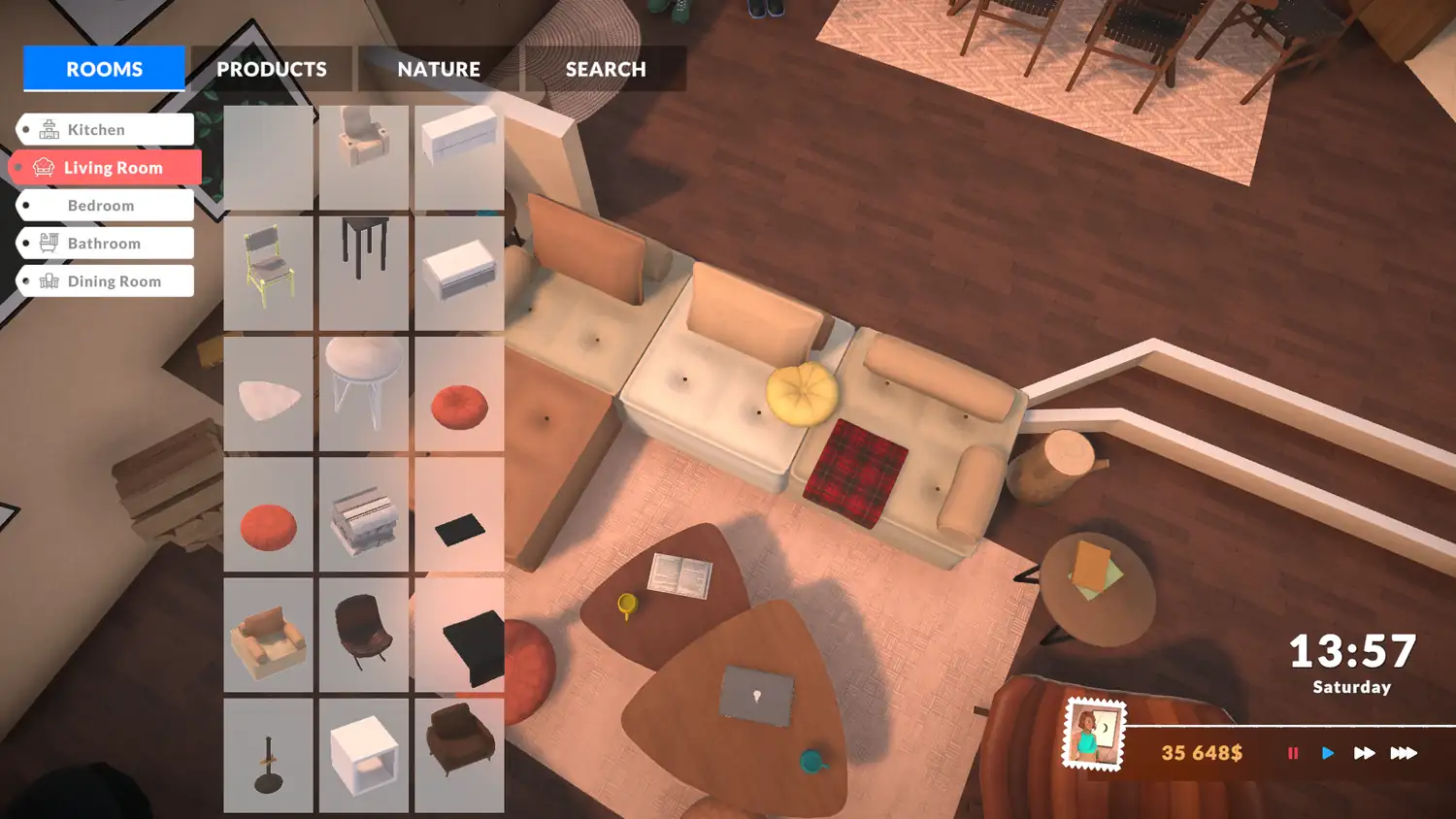
Managing Your Inventory
If you have too many, you can resell items and earn a bit of money in the game. You can also take items out of your inventory to place them in your house or on your lot. Be careful, though, you can't place items outside your property.
Note
Cooked dishes can be stored in the inventory without risk of spoiling. Items like gems or mushrooms can also be added to the inventory.
Inventory Limits
- While there are no limits on the type of item added, money or space are often limited. So you need to regularly sort through your inventory.
- Since you can't place items outside your lot, this can restrict some of your creative options.
Share this article
What is your favorite inventory strategy in Paralives?
Frequently asked questions
How do you access build mode in Paralives?
You can access build mode by clicking the "Build Mode" button located in the bottom left of the screen, or by pressing the TAB key on your keyboard.
How do I add an item to my inventory?
Select the item of your choice from the available categories, customize it if needed via the options bar at the bottom of the screen, then click the three dots and select "Add to inventory".
Can I place items anywhere on the map?
No, you can only place items on your own property. Placing them outside your lot is not possible in the game.
Can the food in my inventory go bad?
No, cooked meals keep without any risk of expiring in your inventory, so you can store them without worry.
What limits the size of my inventory?
Available space and in-game money are often limited, which requires regularly sorting your inventory to keep only the essential items.
Key takeaways
- Access build mode by clicking the button in the bottom left or pressing TAB to unlock all items.
- Select an item, customize it via the options bar, then click the three dots to add it to your inventory.
- You can resell your items to earn money or place them in your house, but only on your own property.
- Cooked meals, gems, and mushrooms can be stored in the inventory without any issue, as they never expire.
- Space and money are limited, requiring regular sorting of your inventory to optimize your creations.
Comments
No comments yet. Be the first to react!
Leave a comment
Similar guides


Latest articles







Your opinion counts
Rate Paralives
Click a star to rate