



 Alexandre Jollier
Beginner's Guide
Pokémon Champions Loaner Teams: Complete Guide
In brief
Replica teams in Pokémon Champions are custom teams that you can create and share via codes with other players. Unlike previous versions, you must already own the Pokémon and items to use a replica team, which makes them composition guides rather than borrowed teams.
Replica teams, in Pokémon Champions, are created by players themselves: each Pokémon on this team is carefully chosen to play a specific role in synergy with the other Pokémon on the team. This article will explain everything you need to know about replica teams and how to use them.
What are replica teams?
Replica teams are therefore mainly custom teams that you can share by assigning them a code. This allows other players to borrow your team, provided they have the code, whereas they would not have been able to use it otherwise.
Note
It should be noted, however, that the way replica teams work has changed in Pokémon Champions compared to previous games.
How replica teams work
In earlier versions, replica teams allowed you to take ownership of Pokémon and items that other players had, but that we did not. However, in Pokémon Champions, to access a replica team, you must already own the Pokémon as well as the items. These teams are therefore no longer borrowed; instead, they can be seen as “vehicles” that let you build a team from the elements you already have.
This may seem very restrictive at first glance; however, replica teams retain their value, as they become a foothold for players who struggle to put together a solid team.
Using a replica team
Open the central training menu and go to the training tab for Pokémon, replica teams, and tutorials. Selecting this option lets you build your team from an identification code, or share your own battle team. If you choose to build from a code, you must enter another player's code, such as those you can find on social media. Forums like Reddit or Discord can be a good source of these codes.
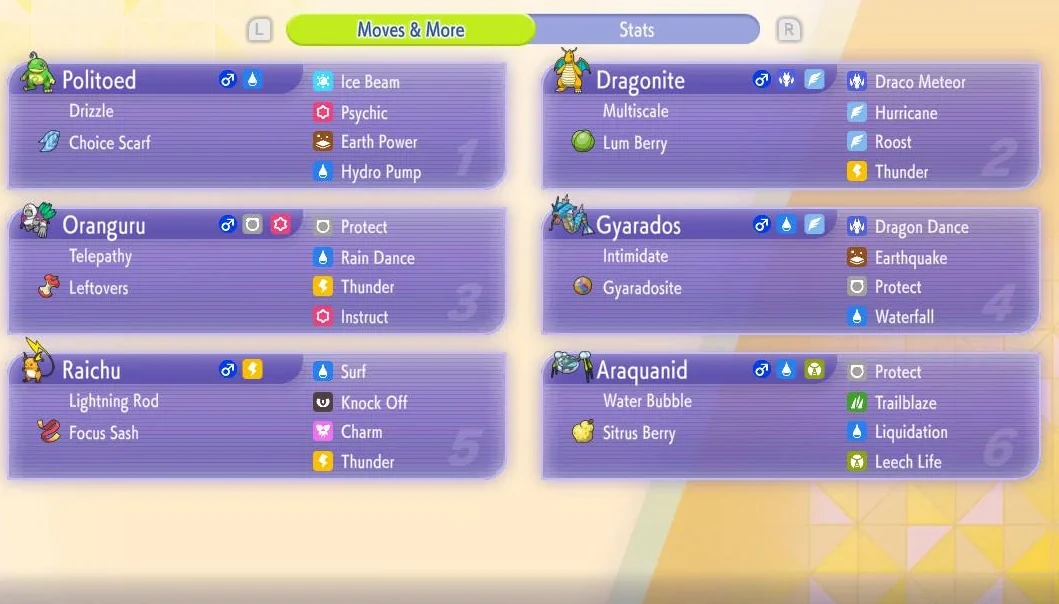
Once the code is entered, all the Pokémon on the team will be displayed, along with their moves, stats, and items. If you wish to replicate this team, confirm your choice. If you don't have the team's components, they will appear grayed out. You will also see the PV cost for each Pokémon, and how many points you will need to spend to train them.
How to share a replica team
As with using a team, start by choosing the replica team menu option to share your battle team. An empty slot will then appear, which you can fill with one of your teams. Once you've chosen the team, check that your setup is accurate.
Once your team has been shared, the code will be generated automatically. Other players will be able to use this code to access your team. To stop sharing a team, return to this page and choose the option to disable sharing.
Share this article
Do you use replica teams to improve your composition?
Frequently asked questions
How do you use a replica team in Pokémon Champions?
Go to the training menu, select the replica teams tab, and enter another player's code. The team will display with all details (moves, stats, items). Pokémon you don't own will appear grayed out.
What's the difference between current replica teams and those from previous versions?
In older versions, you could borrow Pokémon and items you didn't own. In Pokémon Champions, you must already own every element of the team to replicate it, which makes them more like composition guides.
How do I share my own replica team?
Go to the replica teams menu, select the share option, and choose one of your teams. A code will automatically be generated that you can share on social media, Reddit, or Discord.
Where can I find replica team codes?
Codes are mainly found on social media, Reddit forums, and Discord servers dedicated to Pokémon Champions, where players share their team compositions.
Key takeaways
- Replica teams are custom teams shared via codes between players.
- You must already own all the Pokémon and items to replicate a replica team.
- Access replica teams via the training menu by entering an identification code.
- Share your own team and automatically receive a code that others can use.
- Replica teams serve as starting points for players struggling to build a solid team.
Comments
No comments yet. Be the first to react!
Leave a comment
Similar guides


Latest articles







Your opinion counts
Rate Pokémon Champions
Click a star to rate