



 Fabian Lainé


Beginner's Guide
Pokémon Champions: getting started guide
In brief
Pokémon Champions is a competitive online battle game with no leveling and no Pokédex to fill out. This guide covers your first few hours: creating your account, linking Pokémon HOME to access your creatures, choosing your starter from ten pre-built teams, and properly preparing before your first ranked match.
Since April 2026, Pokémon Champions has occupied a place all of its own within the Pokémon galaxy. No region to explore, no Pokédex to fill, no gyms to challenge: right from the title screen, the game throws you into a battle ring to face other trainers online. It's closer in spirit to a modernized Pokémon Stadium than to a traditional RPG, with a firmly competitive orientation and a free-to-play architecture that lowers the barrier to entry.
The title is available on Nintendo Switch and Switch 2, an iOS/Android mobile version is being rolled out alongside it, and it works hand in hand with Pokémon HOME. In other words, your library built up over several generations can feed your competitive team without going through yet another round of grinding. This guide covers the very first hours, from launching the app to your first real ranked match.

Creating Your Account and Completing the Tutorial
On the very first launch, the game asks you to sign in with a Nintendo Account. On both mobile and Switch, this is the key that will later link your profile to Pokémon HOME: it's therefore best to use the same account as your other Pokémon games right from the start, otherwise setting up the bridge with HOME later on will be complicated.
Next comes a mandatory tutorial covering the basics: selecting moves, managing turns, switching Pokémon, and reading type weaknesses. It's short, but more importantly, it can only be played once: there's no way to replay it later. So take the time to read each screen rather than mashing the A button. At the end of this introductory run, a flat reward of Victory Points (VP) lands in your bag, along with a few recruitment tickets, giving you enough material to breathe easy.
Tip: even before creating your profile, take a look at the "Mystery Gift" section of the main menu. It hosts promotional codes that The Pokémon Company regularly distributes through its official channels, often offering VP or tickets. Grabbing these codes early on means that much more free material for your first decisions.
Link Pokémon HOME from your very first session
Going through Pokémon HOME before diving into competitive play changes everything: a dedicated VP bonus drops as soon as the link is established, your Pokémon bred in Scarlet/Violet or Legends: Z-A immediately join Champions for supported species, and their stats are automatically recalibrated to the online format — no need to hunt down the perfect specimen before transferring.

The exact procedure on the HOME side, the list of compatible games, the gifts tied to linking, and the finer points of the two-way transfer are detailed in our dedicated guide to Pokémon HOME and Victory Points.
Taking a first look around the interface
Once you're past the tutorial, the main screen is split into a handful of sections worth remembering:
- Battle: launch ranked matches, casual matches, private matches and official online competitions.
- Box: your virtual PC, it holds every Pokémon you've obtained or transferred.
- Train: the customization menu where you adjust stats, moves, ability and Stat Alignment.
- Recruit: the hub for getting new creatures, on trial, with tickets or permanently.
- Missions: daily, weekly and permanent ones, they're the real tap for VP.
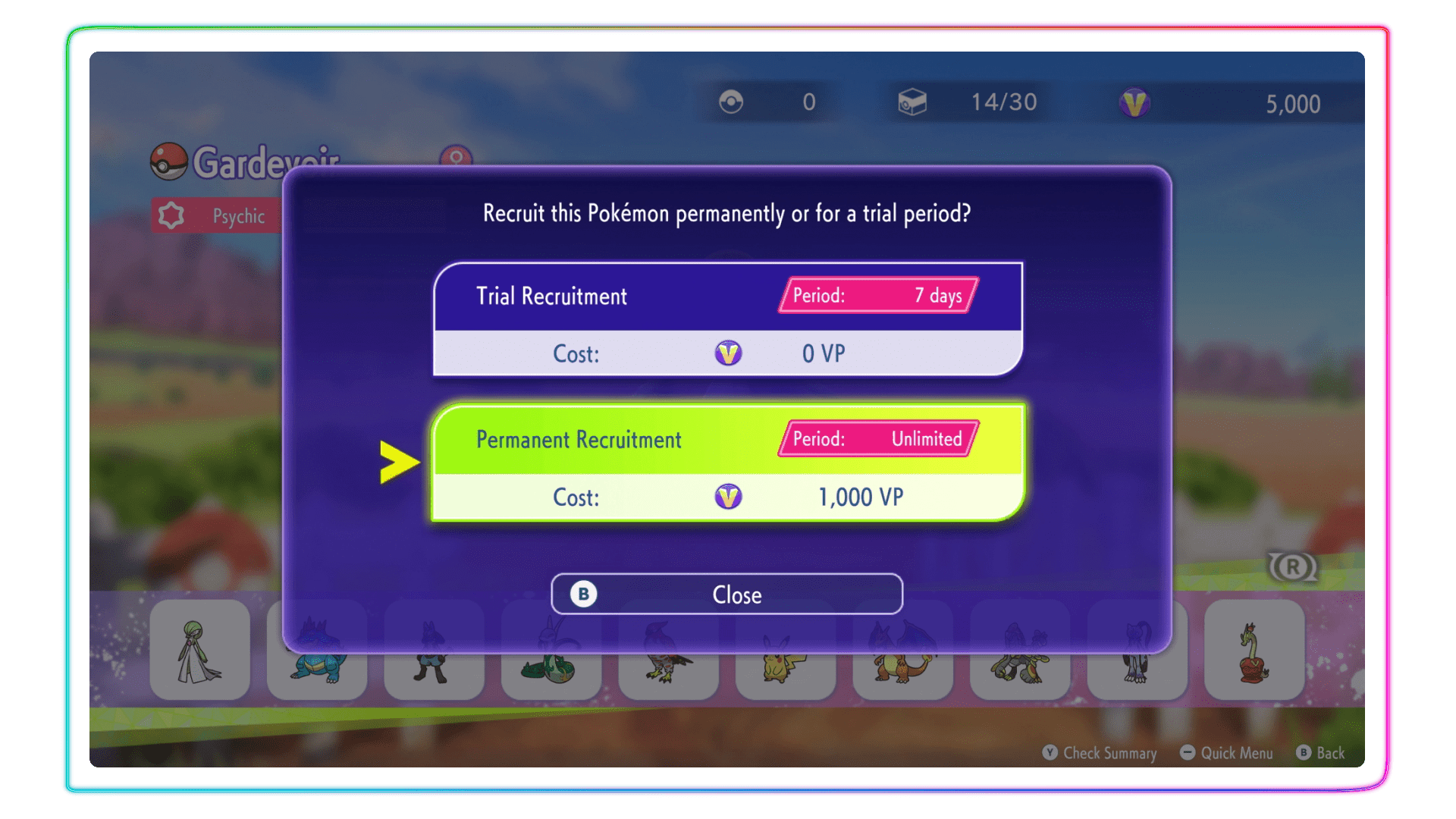
Recruitment deserves a further word. There are three modes: the free Trial Recruit, available every 22 hours, which lends you a Pokémon for a few matches, Standard Recruit, which adds it for good in exchange for VP, and Ticket Recruit, via the tokens handed out by missions. Early on, it's best to favor trials to test out Pokémon before sinking your whole stash into them.
Choosing your starter and starting team
After the tutorial, Champions asks you to select a Featured Pokémon from among about ten iconic figures: Charizard, Tyranitar, Pikachu, Lucario, Gardevoir, Absol, Altaria, Snorlax, Palafin or Armarouge. This choice isn't symbolic: each Featured Pokémon comes bundled with a prebuilt team of five companions, designed to be ready for online play right away. In under fifteen minutes, then, you find yourself in charge of a complete squad of six creatures.
For a player new to competitive play, two options stand out. Charizard and Gardevoir are versatile and forgive positioning mistakes thanks to good type coverage. Pikachu excels in offense-oriented singles, while Tyranitar shines above all in doubles battles thanks to its synergy with the partners provided. This choice is final: there's no going back afterward, so give it a few minutes of thought.
Note: the details of the ten starting teams, along with their associated Pokémon and each squad's strategic focus, are covered in our guide to the preset teams. Open it alongside this choice, it's the best decision-making aid.
Victory Points: what they're for
Victory Points are the game's only currency and can never be bought with real money. You spend them to recruit Pokémon, redistribute EVs, teach a move, or change ability or Stat Alignment (Champions' new name for nature).
Right from the end of the tutorial, the starting reward and the initial missions already leave you with a nice sum for your first decisions. The details of recurring sources, the exact rates per activity and spending strategy are covered by our guide dedicated to Pokémon HOME and Victory Points.
Going through training and the AI coach
Before diving into Ranked mode, a detour through the Train menu is essential. That's where the game rolls out its advanced tutorials: Solo (3v3), Duo (4v4 VGC-style), weather management, priority, switching and held items. The AI coaches pit you against calibrated scenarios, with a computer that comments on your choices and offers alternatives.
Don't skip them: the rewards tied to these sessions are unique and won't come back. Completing them in order nets you thousands of BP, Mega Gems, recruitment tickets, and extra slots in your Box. Skipping this step basically means working at a loss for several weeks of play.
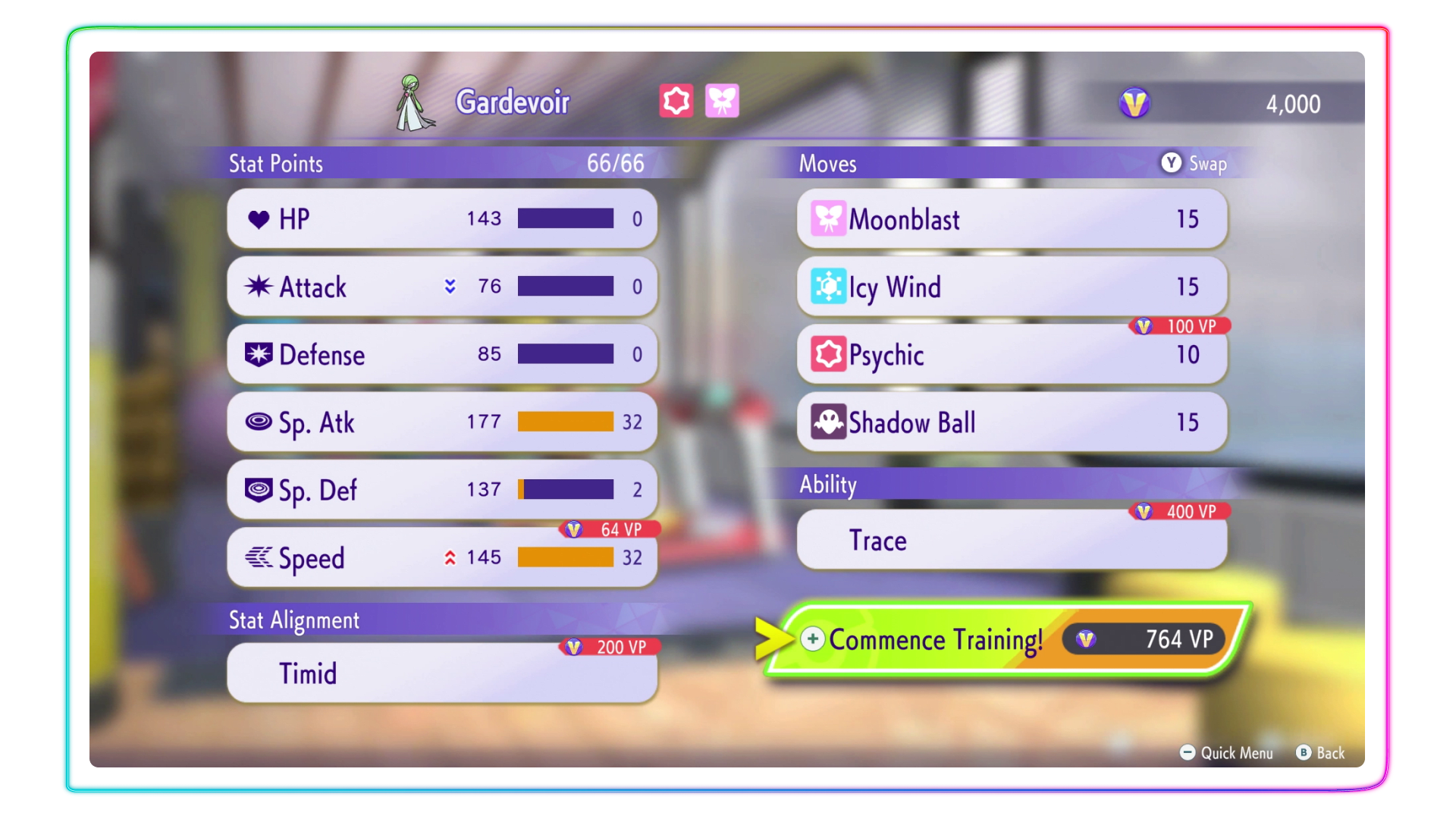
Tip: train your Pokémon in Scarlet/Violet or Legends: Z-A before transferring them, and their EVs will travel with them. This saves you hundreds of BP per creature, which you can reinvest in more ambitious recruitments or in a Nature change.
Precautions before your first ranked match
Ranked mode opens up as soon as the tutorial ends, but it's tempting to rush into it too soon. Three checks to run through before hitting that button:
- Missions and training sessions completed: they feed your BP budget and keep you from being left short when it comes time to customize a team.
- Nature and Ability checked on every team member: a starter as given doesn't always have the optimal nature, and the full procedure is described in our guide on changing nature.
- Team Preview understood: before every match, you see the opponent's team and choose your lineup with full knowledge. Take the time to read all six thumbnails rather than confirming blindly.
One last recommendation: always start with the Solo format, which is easier to read for your first climb. The Duo format, modeled on the official VGC, adds extra layers (protection, redirection, managing two simultaneous threats) that are best tackled once you've grasped the basics. Only Mega Evolution is currently truly usable in battle: our dedicated guide to special mechanics details how to trigger it and gives an update on the gimmicks still pending. Finally, remember that Casual mode exists precisely so you can test your teams without risking a drop in rank.
To go further on Playnews
This overview deliberately covers the early hours. To dig deeper, several dedicated guides await you on Playnews: our feature on copy-team compositions details the best lineups to copy, the one devoted to changing nature via stat Alignment walks you step by step through fine-tuning your Pokémon, our article on battle modes breaks down every available format, and finally the "playing with friends" guide explains how to set up a private room for training sessions with your buddies. Everything you need to smoothly go from beginner status to a regular at the top of the ranked ladder.
Share this article
Would you rather start out in Solo mode or dive straight into Duo?
Frequently asked questions
Can I replay the tutorial later?
No, that's not possible. The initial tutorial only plays once, so take the time to read each screen instead of mashing A. This is your only chance to absorb the fundamentals at your own pace.
How can I unlock all the Pokémon quickly?
There's no instant unlock. You recruit them using Victory Points or recruitment tickets earned from missions. The free trial available every 22 hours is perfect for testing a Pokémon before spending your VP on it.
My starting starter isn't optimal, can I change it?
No, this choice is final. Take a few minutes before confirming to check the mirror teams guide, which details the strategic value of each starter.
Do my Scarlet/Violet Pokémon keep their EVs when brought into Champions?
Yes, completely. EVs carry over with them through HOME, which saves you hundreds of VP per creature to reinvest elsewhere.
Is it absolutely necessary to go through Pokémon HOME right from the start?
Honestly, yes. It gives you an immediate VP bonus, your creatures arrive recalibrated to the online format without needing to farm the perfect specimen, and it simplifies integration with your other games.
Key takeaways
- Create your profile with the same Nintendo Account as your other Pokémon games to make linking with HOME smoother.
- Don't skip through the introductory tutorial: it only plays once and contains essential battle basics.
- Go through training against the AI coaches before heading into Ranked mode—that's where you earn the real rewards and get to grips with the game.
- Your starter choice is final and predetermines your team: read the mirror teams guide before confirming.
- Victory Points can never be bought with real money, so spend them strategically to recruit and customize your Pokémon.
Comments
No comments yet. Be the first to react!
Leave a comment
Similar guides




Latest articles








Your opinion counts
Rate Pokémon Champions
Click a star to rate