



 Alexandre Jollier

Equipment
Phasmophobia Watch: How It Works and How to Use It
In brief
The watch is a new indispensable tool built directly into your avatar in Phasmophobia. It displays your sanity via a colored circle, a timer to track elapsed time, and a microphone status indicator, quickly becoming essential for good team coordination.
With the "characters" update to Phasmophobia, the watch has made its appearance and will quickly become indispensable. Let's look at how to make the most of this tool!
Why a watch in Phasmophobia?
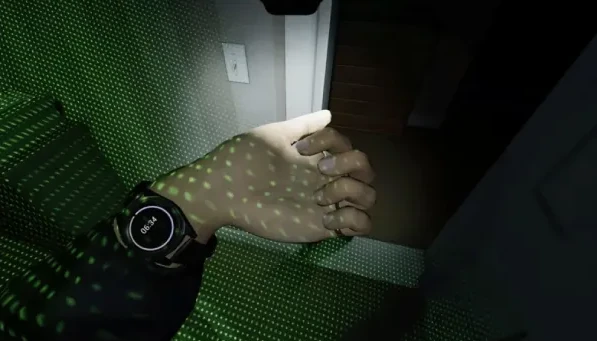
The watch is a versatile and very interesting tool. It is directly built into your avatar, whereas other tools can only be carried in your inventory. The watch features a colored circle at the center of its dial that represents your sanity. It is one of the few tools that will let you monitor this aspect without having to look back.
In addition, at the center of the watch is a stopwatch that measures the time elapsed since your arrival on the mission. It will help you know when the preparation period is over. Finally, its microphone shape indicates whether you are currently talking or not, meaning whether your mic is active or not.
How to check your watch in Phasmophobia
There are mainly two ways to open your watch in the game:
- Open the Journal, the simplest solution.
- Hold down the use button, if your left hand is free, holding this button will display your watch.
Note
The watch is already automatically equipped on all characters without needing to add it to your inventory, and there is no option to remove it.
Strategies
Use the stopwatch to plan your actions: for example, you might decide to spend 10 minutes investing in finding evidence before taking a break.
Inform your teammates of your mental state by using the watch as a reference, which can help you coordinate your efforts to avoid ending up in a tricky situation.
Share this article
Does the watch change the way you play Phasmophobia?
Frequently asked questions
How do I check my watch in Phasmophobia?
There are two main methods: open the Journal for the simplest solution, or hold down the use button if your left hand is free to display your watch directly.
What does the colored circle on the watch represent?
The colored circle at the center of the dial represents your sanity, letting you monitor this crucial aspect without having to head back to the truck.
Can I remove or disable the watch?
No, the watch is automatically equipped on all characters with no option to remove it. It remains accessible at all times.
How do I use the timer to optimize my strategy?
You can plan your actions based on time, for example by spending 10 minutes searching for evidence before taking a break, which helps you better structure your mission.
Key takeaways
- The watch is directly built into your avatar, unlike other tools that take up space in your inventory.
- The colored circle in the center displays your sanity without needing to head back to the truck.
- The timer lets you measure elapsed time and know when the preparation period ends.
- You can check your watch via the Journal or by holding down the use button with your left hand free.
- Coordinate your team's efforts by sharing your mental state via the watch to avoid difficult situations.
Comments
No comments yet. Be the first to react!
Leave a comment
Similar guides

Latest articles







Your opinion counts
Rate Phasmophobia
Click a star to rate