



 Fabian Lainé
Tips
Phasmophobia: one line in the August 25 update resets your multiplier to zero — and four other lines nobody read
In brief
Phasmophobia's August 25, 2026 quality-of-life update hides an ergonomic bomb: checking the ghost type selection box resets your multiplier to zero, wiping out earnings and experience. Four other discreet lines — legacy badges, the Hold Use reminder, video evidence text, and the mic icon — fix real annoyances without making headlines.
The preview for Phasmophobia's second comfort update, due out on August 25, 2026, was read everywhere for three reasons: the new maps in Restricted difficulty, the journal overhaul, and the entirely replaced VR rig.
Beneath these three announcements, Kinetic Games published a list of short lines. One of them can cost you the entirety of a contract's earnings, and it fits in a single sentence. The other four are small things you spend twenty minutes looking for on the day you need them.
The zero line: choosing the ghost type resets your earnings
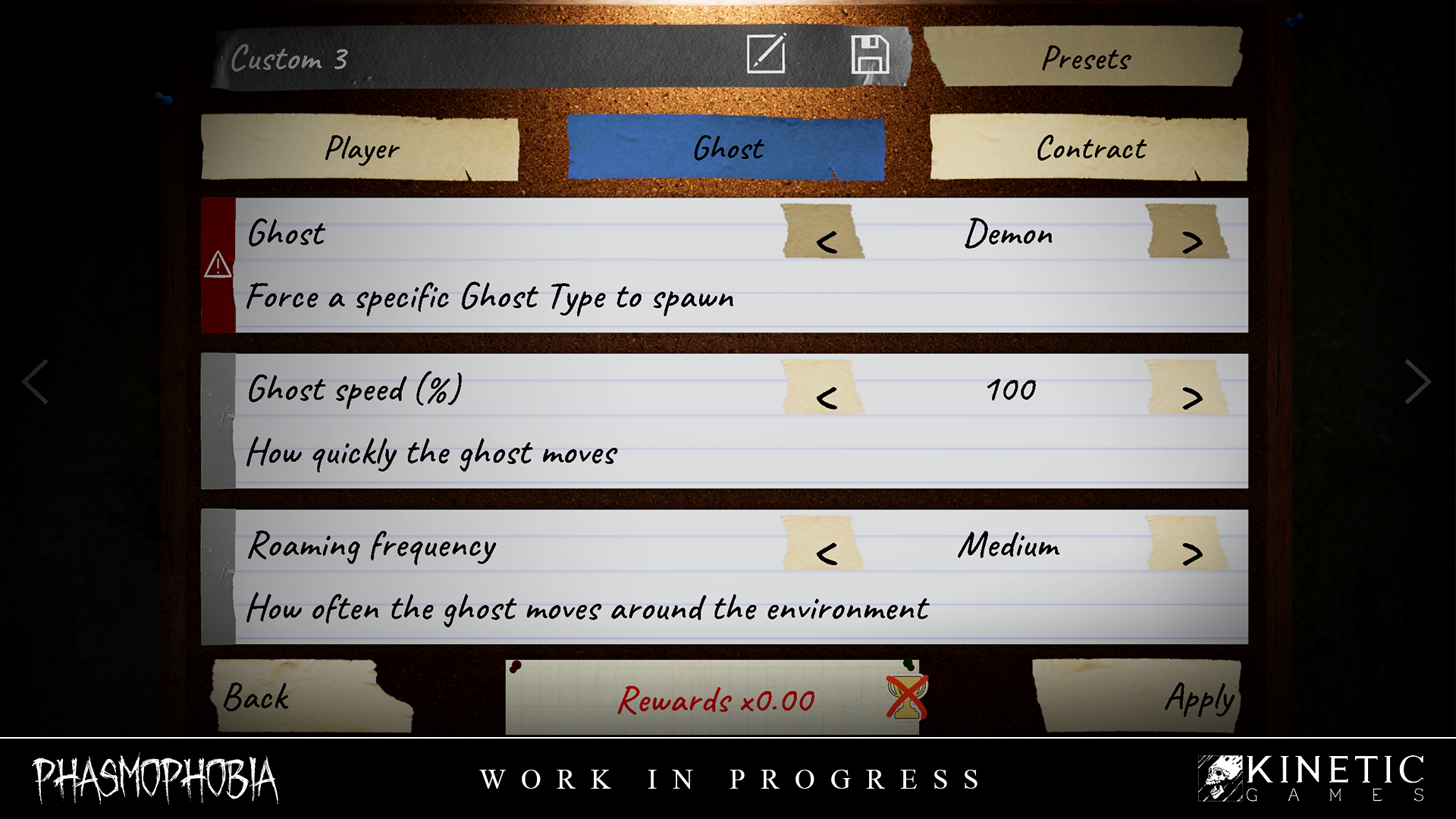
The official text, in the "New" section: "Added the ability to select the ghost type in a custom difficulty, which will reset the multiplier to 0."
In Phasmophobia, the multiplier is the variable that determines the money and experience paid out at the end of a contract. A multiplier of 0 doesn't mean "less": it means nothing. No money, no progression.
This is a defensible design choice — knowing in advance which entity you're dealing with strips the investigation of its purpose, and therefore of its reward. But the implementation creates a trap, and it's purely a matter of ergonomics: the checkbox is located in the ghost settings, at game creation, meaning right in the middle of the dozens of settings that are precisely the ones meant to raise that multiplier.
The scenario to dread is simple. You spend ten minutes putting together an aggressive setup aimed at a high multiplier. Scrolling down the list, you check the ghost type box "just to see." You launch the game. The contract goes normally, you come out alive, and the end screen shows zero.
Who really needs to watch out
Three types of players have a direct interest in knowing about this line before August 25.
Those who build high-multiplier setups. If you tweak your settings to reach the high tiers, one box checked out of distraction reduces all your work to nothing. Re-read the ghost settings page before confirming, not just the difficulty page.
Those who save reusable configurations. A new option appears in a screen you may have left untouched for weeks. Reopen your presets after the update instead of relaunching them blindly.
Those who play for money or experience. A contract with a zero multiplier doesn't move the level counter forward. If you're farming, this option should never be active.
When to check it on purpose
There is one case where it's excellent, and it's the one it was created for: learning the bestiary.
Until now, working on the behavior of a specific entity meant running into it by chance. For rare entities, or ones with evidence close to another's, that could mean about ten contracts before hitting the right one. With this option, you force the entity and observe it as much as you want.
The mindset to adopt, then, is one of budgeting: a training session at zero multiplier costs nothing but the time spent, since you weren't playing for the money anyway. What you shouldn't do is mix the two — a training session and a farming session, but not in the same game.
The four other lines everyone skipped
The rest of the official list contains four additions that won't make headlines anywhere, but each addresses a real annoyance.
A "Legacy Badge" section in the customization shop. It lets you change your badge at any time, whereas the choice was until now much more fixed. An important clarification to avoid false hopes: "players without the Legacy badge will not see this option". This is a section reserved for those who already own the badge, not a way to obtain one.
A "Hold Use" reminder on the training whiteboards. Holding the use button instead of pressing it is one of the least discoverable interactions in the game, and it governs several actions. Indicating it on the boards in the training area fixes a tutorial problem as old as the game itself.
A specific video evidence text for the shower and the electrical box. Two entity interactions that the video camera had until now flagged with a generic label. They will now have their own mention, which concretely changes how you read a recording: you'll know what the camera saw, not just that it saw something.
The speaker icon on ID cards now works for everyone, including the local player. This is the most discreet fix and one of the most useful in group play: until now, you couldn't check that your own mic was being picked up. There should now be fewer "can you hear me?" moments per match.
What these five lines say about the update
Taken together, they reflect the same intent as the major pieces of the announcement: reducing back-and-forth trips and checks. No more going back to the truck to find out if a photo counts, no more asking a teammate what they've checked off, no more asking if your mic is coming through, no more guessing what the camera filmed.
The ghost selection option follows the same logic — removing uncertainty — but it's the only one that comes at a cost. And it comes at full cost.
What to remember before August 25
The exact rollout time has not yet been set: Kinetic Games has announced the update on all platforms for August 25 and points to its official channels for confirmation of the precise time.
Until then, there's only one thing to do: note that the ghost settings page will have one more checkbox, and that it doesn't behave like the others. The other custom difficulty options make the multiplier vary, up or down. This one sets it to zero outright, regardless of the rest of your configuration.
A final method reminder: the list published by the studio covers new features and changes, not fixes. The full list of fixed bugs will be published on release day. Everything circulating today beyond these points is a matter of deduction, not official announcement.
Share this article
Faced with this zero-multiplier trap, how do you react?
Frequently asked questions
What exactly does a zero multiplier mean in Phasmophobia?
Zero means nothing: no money, no experience awarded at the end of the contract. It's a reward black hole, even if the contract went smoothly and you survived.
How can you avoid accidentally checking this fatal box?
Read through the entire ghost settings page before starting your game, not just the difficulty page. If you have saved presets, reopen them after the update to check that the box isn't ticked.
When should you actually select the ghost type?
Only for learning the bestiary and observing a specific entity's behavior. The zero multiplier only costs you time since you're not playing for money anyway.
What does the Legacy Badge section actually bring?
It lets you change your badge at any time in the customization shop. Note: this option only exists for those who already own a Legacy badge, it's not a way to obtain one.
When exactly is the update rolling out?
On August 25, 2026 across all platforms, but the exact time will only be announced on Kinetic Games' official channels. The full patch notes will be released on deployment day.
Key takeaways
- Selecting the ghost type in custom difficulty completely cancels your multiplier, regardless of your setup.
- This checkbox sits within the ghost settings, in the same spot as the options that boost it, creating a formidable ergonomic trap.
- The ghost selection option is worthwhile for learning the bestiary, but only at zero multiplier — never during a farming session.
- The four other lines reduce back-and-forth: checks for photos, video recordings, mics, and ticked options.
Comments
No comments yet. Be the first to react!
Leave a comment
Similar guides
Latest articles



Your opinion counts
Rate Phasmophobia
Click a star to rate