



 Alexandre Jollier

Beginner's Guide
Saros Carcosian Modifiers: How to Change the Difficulty Level
In brief
Saros' Carcosan Modifiers let you customize the game's difficulty according to your playstyle and skill level. Find out how to unlock them, configure them in the options menu, and strike the perfect balance between challenge and enjoyment to progress without frustration.
In Saros, you are faced with a constant challenge: die, learn, and come back stronger. However, there comes a point where upgrades hit a ceiling, and it becomes important to adjust the difficulty to keep progressing without too much frustration. This article will guide you through the different ways to customize difficulty in Saros.
What Carcosian Modifiers are for
These are essential tools, as they will let you change the game's difficulty. Once you've unlocked the main feature, you'll gain access to these modifiers, which can change the way you play.
How to change the difficulty in Saros
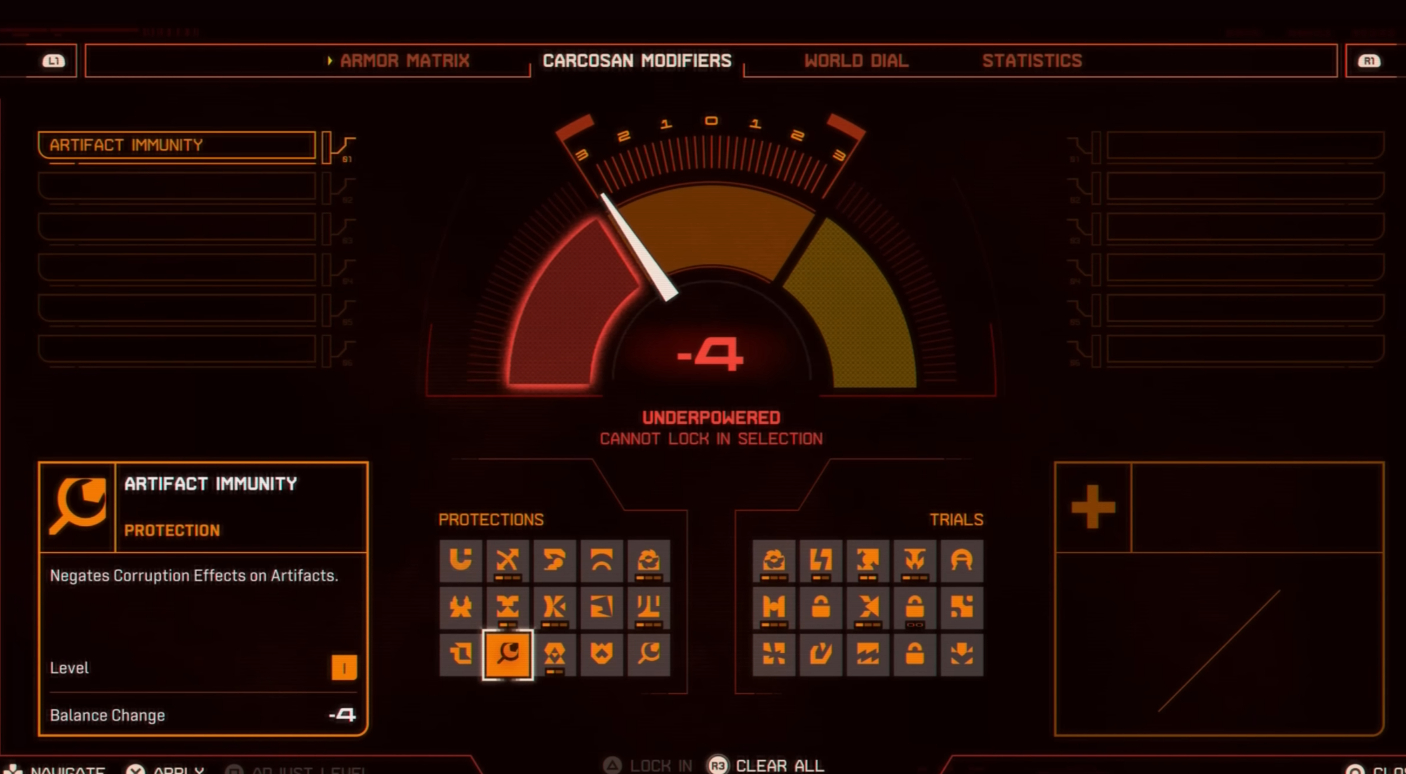
To change the difficulty, go to the options menu after unlocking the Carcosian Modifiers. You'll be able to view the available modifiers and experiment with their specific effects on the game.
Note
It is absolutely essential that the modifiers you choose match your playstyle: if you want to explore without too much resistance, choose modifiers that boost your damage effects against enemies or reduce your resource consumption!
How to make Saros easier
To optimize your progress through the levels, you can add modifiers that boost your abilities: for example, a modifier that no longer consumes power when you use your shield will let you move through already explored areas more quickly.
Each easing modifier comes with a trade-off: you'll have to give up certain rewards if you've already gathered enough resources for your future upgrades.
Making Saros harder
A good way to make the game harder is to disable certain abilities: for example, disabling the "Second Chance" skill will force you to make carefully planned moves, since a single misstep will mean starting over.
Alongside disabling skills, you can also activate modifiers that reduce damage dealt to enemies.
Finding the right balance
All the enjoyment provided by Saros lies in the balance between challenge and fun. Before changing the difficulty, assess your skill level and gaming experience. For a beginner, it's worth considering modifiers that ensure a certain level of comfort while playing.
Note
Don't hesitate to actively adjust the modifiers. If you find the challenge too great or too low, go back into the settings and tweak them.
Share this article
What type of difficulty do you prefer for Saros?
Frequently asked questions
How do you unlock the Carcosan Modifiers in Saros?
You must first unlock the main Carcosan Modifiers feature. Once that's done, you'll be able to access it via the options menu to view the available modifiers.
Which modifiers should you choose to make Saros easier?
Opt for modifiers that amplify your abilities, such as the one that removes shield power consumption or increases your damage to enemies. Note that these easing modifiers usually mean giving up certain rewards.
How do you increase Saros' difficulty?
Disable strategic skills like "Second Chance" to force planning, or activate modifiers that reduce your damage against enemies. This will make your mistakes far more costly.
Can I change the modifiers as I progress?
Yes, absolutely. Don't hesitate to actively adjust the modifiers by going back to the settings if you find the challenge too easy or too hard.
Key takeaways
- Carcosan Modifiers are essential for adapting Saros' difficulty to your progression and abilities.
- Access the modifiers via the options menu once you've unlocked them, and test their specific effects.
- To make the game easier, choose modifiers that amplify your damage or reduce resource consumption.
- To increase the difficulty, disable certain abilities like "Second Chance" or reduce the damage dealt to enemies.
- Actively adjusting the modifiers is crucial: don't hesitate to change the settings if the challenge doesn't suit you.
Comments
No comments yet. Be the first to react!
Leave a comment
Similar guides


Latest articles








Your opinion counts
Rate SAROS
Click a star to rate