



 Alexandre Jollier


Pokémon Legends Z-A Nicknames: How to Change Them
In brief
Pokémon Legends: Z-A lets you rename your Pokémon in a much more accessible way than before. After winning your first battle against your rival, you can change nicknames at will via the main menu, without having to look for a specific character.
Pokémon Legends Z-A carries on the tradition of giving custom nicknames to your pocket companions. However, sometimes inspiration gets the better of us, and we end up picking a nickname we later regret. Fortunately, the new game lets you rename a Pokémon in a much more accessible way than before.
Once you've secured the win, you'll be able to change your companions' nicknames at will"

When does the nickname-changing feature unlock?
To be able to use this option in Pokémon Legends Z-A, you first need to reach a key milestone in your adventure. You'll be able to rename your Pokémon once you've won your first battle against your main rival, Urbane or Taunie depending on your choice.
This battle is trivial, since this rival has clearly taken to heart the rule that's been in effect since the sixth generation of games: facing the player's starter, they always choose their weak starter. The tactic is therefore extremely simple: use the attack matching your Starter's type (Grass, Fire, or Water) to knock out their Pokémon quickly.
Once you've secured the win, you'll be able to change your companions' nicknames at will, without needing to track down a specific character like the Name Rater from previous games.
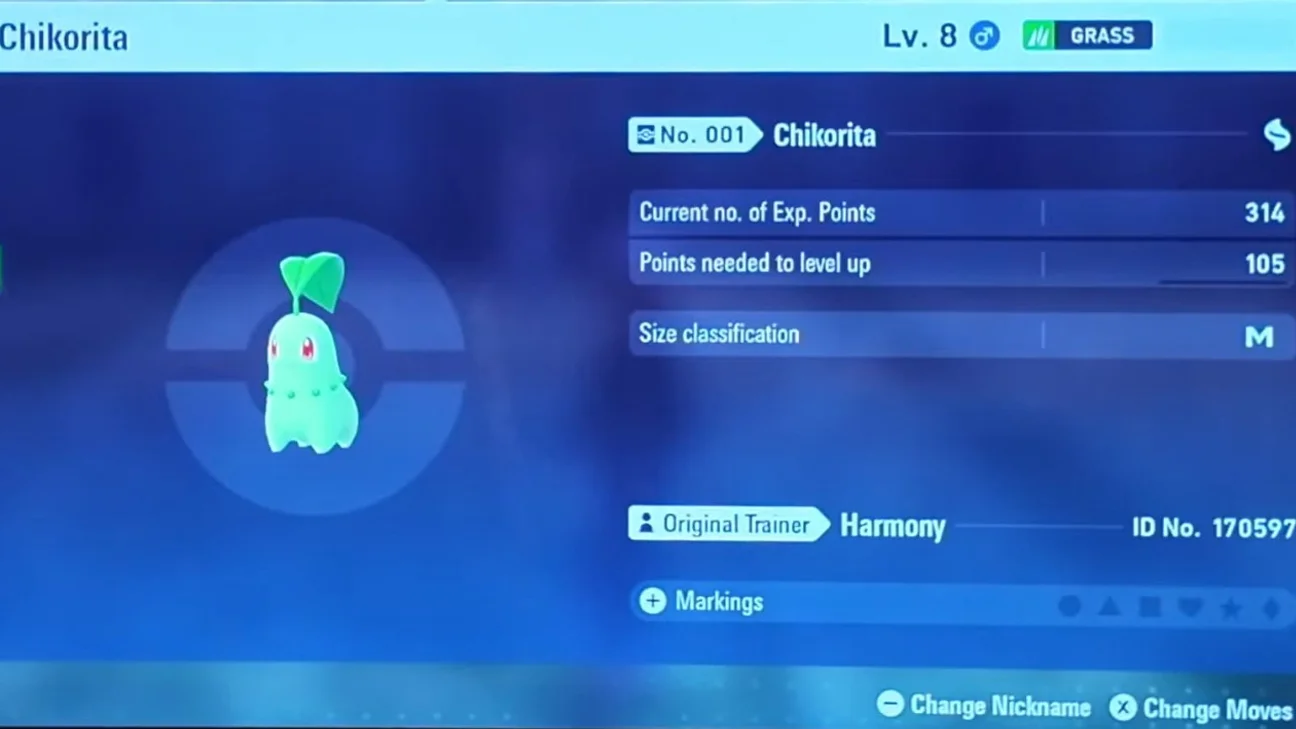
How to change a nickname
To rename one of your Pokémon in Pokémon Legends Z-A, here's what to do:
- Press the X button to open the main menu
- View the team of Pokémon currently accompanying you
- Select the Pokémon you want to rename
- Choose the "View Summary" option to access its detailed profile
- On this page, press the minus button to activate the nickname editing screen
As in previous games, nicknames remain limited to a total of twelve characters. It's also worth noting that the filtering system for names deemed inappropriate is still in place. The developers kept this restriction in order to preserve the game's family-friendly spirit, which is essential for online trading.
Share this article
Would you rather be able to rename your Pokémon directly from the menu or through an in-game character?
Frequently asked questions
When can I start renaming my Pokémon in Pokémon Legends: Z-A?
You can unlock this feature as soon as you win your first battle against your main rival, Urbane or Taunie. This battle is trivial since your rival picks a Starter that's weak against yours.
What's the process for renaming a Pokémon?
Press X to open the menu, view your team, select the Pokémon you want to rename, choose "View Summary", then press the minus button to access the nickname editing screen.
Are there restrictions on the nicknames I can choose?
Nicknames are limited to a maximum of twelve characters and must pass through a system filter that rejects names deemed inappropriate, in order to preserve the game's family-friendly spirit and keep online trading safe.
Do I need to look for a specific character to change nicknames?
No, unlike previous games, you no longer need to find a Name Rater. Nickname editing is accessible directly from the main menu once unlocked.
Key takeaways
- The renaming function unlocks after your first battle against your rival Urbane or Taunie
- Access nickname editing quickly via the X menu without looking for a dedicated character
- Nicknames remain limited to twelve characters and go through a filter against inappropriate names
- You can rename your Pokémon at will once the feature is unlocked
Comments
No comments yet. Be the first to react!
Leave a comment
Similar guides


Latest articles








Your opinion counts
Rate Pokémon Legends: Z-A
Click a star to rate