



 Alexandre Jollier


ARC Raiders Personal Stats: How to Check Them
In brief
Discover how to access your personal stats in ARC Raiders via the Raider menu and the Codex tab. This guide details the two main stats sections (Overview and Player Stats) that gather your achievements, eliminations, playtime, and many other essential data points to track your progress.
Knowing your performance can be decisive for the quality of your experience in ARC Raiders. Follow this guide to find out how to check your personal statistics and what interesting data they contain.
"The reset of account level, ranks and, to a certain extent, quest progression is confirmed"

How to access your stats in ARC Raiders
Start by opening the Raider menu from the game's main screen. Once in this menu, go to the Codex tab, which gathers several pieces of information about your progression. Inside, at the very top of the screen, you'll find the "Player Statistics" option. On console, access can also be done by pressing RB (Xbox) or R1 (PlayStation).
The screen will then display all your achievements, from eliminations to completed missions, as well as your playtime.
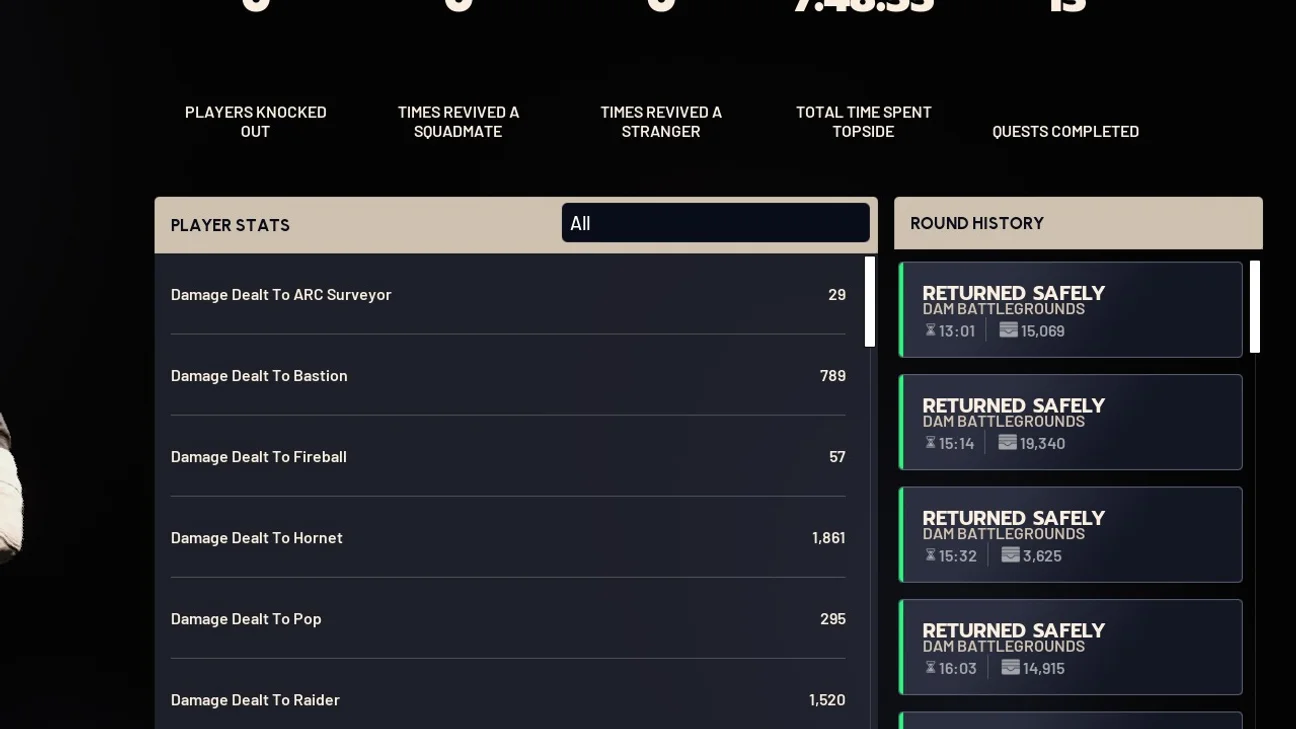
Detailed content of player statistics
Personal statistics in ARC Raiders are divided into two main sections for an overall view of your journey in the game.
The first section, "Overview", is dedicated to the main information: total number of opponents taken down, revives, total playtime, number of completed quests.
The second section, "Player Statistics", carries out a more detailed analysis by looking at specifics such as damage dealt to enemies according to their type, the number of items crafted, and the number of loot crates found.
| Statistic category | Description |
|---|---|
| Players neutralized | Total number of eliminations |
| Teammate revives | Successful teammate rescues |
| Stranger revives | Defibrillator use |
| Time spent Topside | Total playtime |
| Quests completed | Narrative progression tracking |
| Match history | Duration, location and value of each session |
| Rank | Performance in ARC Raiders trials |
| Detailed statistics | Damage, items crafted and loot collected |

Impact of Expeditions on your statistics
A question arises for ARC Raiders players: what happens to your statistics during a reset via Expeditions? Embark Studios has not yet clarified all the details of the first Expedition, but a few indications are known.
The reset of account level, ranks and, to a certain extent, quest progression is confirmed. As a result, it's likely that at least part of the personal statistics menu will also be wiped.
For those who want to keep an eye on certain goals, such as tracking a specific number of items to collect, the statistics menu doesn't provide a customizable tool, but the "Track" function can be activated on certain upgrades, such as Coquillard's upgrades. When this function is active, a small eye-shaped icon appears next to the materials to be obtained whenever they are encountered.
Share this article
Do you regularly check your personal stats to improve your gameplay?
Frequently asked questions
How do you access personal stats in ARC Raiders?
Open the Raider menu from the main screen, go to the Codex tab, then click on "Player Stats" at the top of the screen. On console, you can also press RB (Xbox) or R1 (PlayStation).
What are the two main sections of player stats?
The first section, "Overview", gathers key information such as eliminations, revives, and playtime. The second section, "Player Stats", offers a more detailed breakdown with damage by enemy type, crafted items, and loot collected.
What happens to my stats during an Expedition?
The reset of account level, ranks, and part of quest progress is confirmed, which means that at least part of your personal stats menu will also be wiped.
How do you track your custom goals in ARC Raiders?
Use the "Track" feature available on certain upgrades, such as Coquillard's evolutions. An eye-shaped icon will then appear next to the materials to obtain whenever you come across them.
Key takeaways
- Access your stats by opening the Raider menu, then the Codex tab and the "Player Stats" option
- The "Overview" section displays key information such as the number of eliminations and your total playtime
- Detailed stats break down damage by enemy type, crafted items, and loot collected
- Your stats will be partially reset during Expeditions, including account level and ranks
- Use the "Track" feature on certain upgrades to keep an eye on your custom goals
Comments
No comments yet. Be the first to react!
Leave a comment
Similar guides






Latest articles







Your opinion counts
Rate ARC Raiders
Click a star to rate